ASUS Chromebox 5a (Core i3-1315U) — Practical ChromeOS Mini PC for Work, Signage & Labs
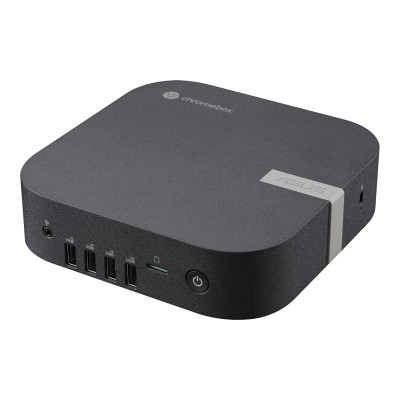
The ASUS Chromebox 5a is a “no-drama” ChromeOS mini PC built for reliable, always-on use in places where downtime is expensive and maintenance is annoying: digital signage, kiosks, reception desks, classrooms, shared office PCs, and computer labs. It focuses on the things that matter in those environments—multi-display support, stable networking, compact mounting, and fleet-friendly management—instead of trying to be a “do everything” Windows box.
For the NationalPC configuration (Core i3-1315U + 16GB RAM + 128GB NVMe SSD), you’re right in the sweet spot: fast day-to-day responsiveness, lots of headroom for heavy Chrome usage, and quick app loading thanks to NVMe storage.
What makes Chromebox 5a a smart “deployment PC”
1) Multi-display done the simple way
One of the biggest reasons organizations buy Chromebox-class systems is multi-screen output without GPU drama. Chromebox 5a is positioned for up to four 4K displays using a combination of dual HDMI + DisplayPort + USB-C (actual ports can vary by region/SKU, but that “quad 4K” capability is core to the product line).
2) Low-maintenance by design (ChromeOS advantage)
For shared systems—think front desk, tuition counter, OPD token display, exam labs, training rooms—ChromeOS tends to stay stable because:
-
Updates are streamlined
-
User profiles are easy to reset
-
Policy-based controls reduce “someone installed something weird” issues
Chrome Enterprise / enrollment workflows
3) Network stability for always-on roles
Digital signage and kiosk setups usually fail because of network dropouts, not because the CPU is slow. Chromebox 5a’s positioning includes Wi-Fi 6E + wired LAN, which is exactly what you want for consistent uptime in dense office / campus environments.
4) Tiny footprint + VESA mounting
This is the “hide it behind the monitor” PC category—clean desk, less tampering risk, easier cable management.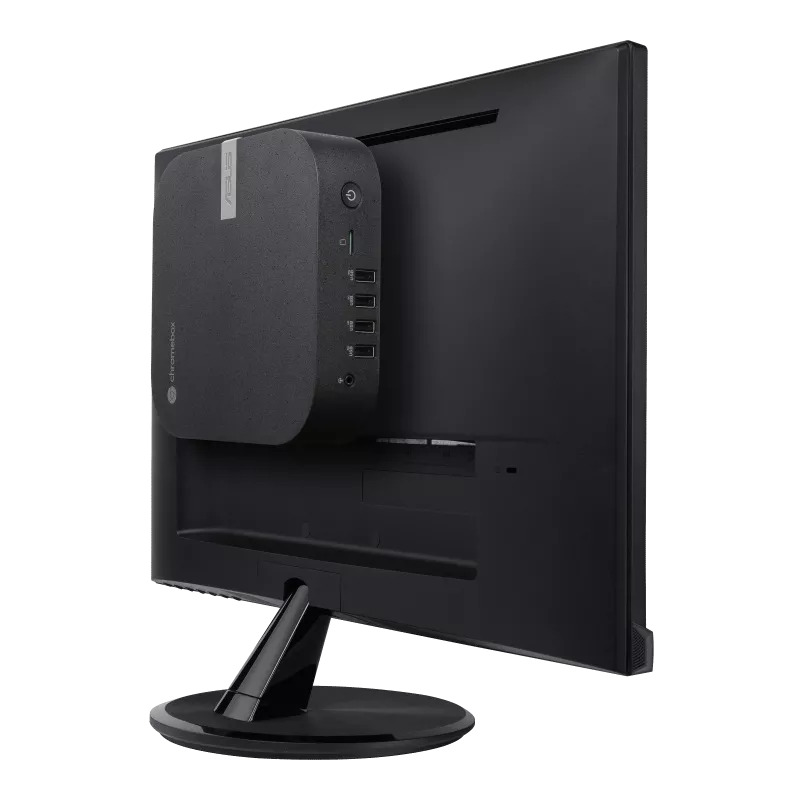
Specs snapshot (NationalPC Core i3-1315U model focus)
| Category | What you get (and why it matters) |
|---|---|
| CPU | Intel Core i3-1315U (13th Gen, U-series) — built for efficient, responsive everyday workloads |
| CPU layout | 2 Performance cores + 4 Efficient cores (total 6 cores / 8 threads) — good for multi-tab and mixed workloads |
| RAM | 16GB — the biggest “feel fast” upgrade for ChromeOS when users run many tabs + Android apps |
| Storage | 128GB NVMe SSD — quick boot, fast app loads; upgrade if you store lots of offline media |
| Graphics | Intel integrated graphics (iGPU) — fine for 4K playback and signage, not meant for gaming |
| Displays | Marketed for up to 4× 4K outputs (port mix depends on SKU) |
| Networking | Wi-Fi 6E + LAN for stable deployments |
| Mounting | Compact + typically VESA-mount friendly (ideal for kiosks / counters / behind displays) |
 Benchmarks (what performance level you’re really buying)
Benchmarks vary depending on cooling and power limits, but they’re still useful to set expectations for “how snappy will it feel?”
CPU benchmark snapshot (Core i3-1315U)
Geekbench 6 (typical results you’ll see):
-
Single-core: ~2200–2300
-
Multi-core: ~6500–7500
Cinebench R23 (CPU render workload, typical averages):
-
Single-core: ~1600–1700
-
Multi-core: ~5200–6200
What those numbers mean in real usage
-
Fast “feel” in ChromeOS: single-core performance is strong enough that UI actions (tabs, menus, web apps, scrolling dashboards) feel quick.
-
Good mixed multitasking: multi-core is plenty for “office + video + web apps + background policies + signage player” simultaneously.
-
Not a workstation chip: it’s not meant for long heavy compiles, big Docker stacks, or serious creative rendering.
Real-world performance: what to expect (i3-1315U + 16GB)
Office + browsing (main use case)
This setup handles:
-
Google Workspace / Microsoft 365 web
-
CRM dashboards
-
POS panels
-
Heavy tab usage (16GB helps a lot here)
Why 16GB matters: Chrome tabs + extensions + Android apps can quietly eat RAM. 16GB keeps the system smooth under shared use.
4K media + digital signage
For signage, the key is stability + outputs, not raw CPU power. With a solid network and proper cabling:
-
Smooth 4K playback is a normal job for this class
-
Great for menu boards, dashboards, queue displays, classroom projectors
-
Multi-display signage works best when you keep content formats consistent (same resolution/refresh targets)
Chromebox 5a is explicitly positioned around quad 4K display support depending on configuration.
Light Linux dev (Crostini), admin tools
Good for:
-
SSH, scripting, basic dev tools
-
Small containers, lightweight services
Not ideal for:
-
heavy Docker + large images
-
long compile pipelines
-
“I want this to replace a full dev workstation”
Who should buy (and who should avoid)
Buy it if you need
-
Reliable ChromeOS for shared/public systems
-
Digital signage / kiosks / reception systems
-
Multi-display output for dashboards and menus
-
Low maintenance + policy control for teams/IT
-
Wi-Fi 6E + LAN for stable uptime
Avoid it if you need
-
Windows-only desktop apps (Tally-like legacy tools, special peripherals with Windows drivers, etc.)
-
Heavy video editing / 3D / GPU workloads
-
Gaming expectations beyond casual/light
-
Large offline local media storage (unless you upgrade SSD or use NAS/network storage)
FAQ
Q1) Is Chromebox 5a good for digital signage?
Yes—this category is built for signage reliability, and Chromebox 5a is positioned for multi-display and stable networking.
Q2) Can it run 4 monitors?
That’s one of the headline capabilities: up to four 4K displays via dual HDMI + DisplayPort + USB-C (SKU-dependent).
Q3) Is 128GB SSD enough?
For ChromeOS + web apps: yes. For lots of offline videos/images stored locally: consider a bigger SSD.
Q4) Is Core i3-1315U powerful enough?
For office work, heavy browsing, signage players, and admin use: yes. Typical Geekbench/Cinebench results show strong everyday performance for this class.
Q5) What’s the real benefit of Wi-Fi 6E?
On compatible networks, the 6GHz band can be cleaner (less congestion), often improving consistency in dense environments.
Buy now (nationalPC CTA lines)
Buy ASUS Chromebox 5a (i3-1315U) from nationalPC — perfect for work, signage, and shared systems.
Limited stock: Order today for faster deployment.
Check Availability / Buy Now:https://nationalpc.in/pre-built-mini-pc/asus-chromebox-5a-i7-1355u-8gb-ram-256gb-nvme-ssd