

ASUS ProArt Display PA247CV Review: A Smart, Color-Accurate Monitor for Creative Professionals
The ASUS ProArt Display PA247CV is a professional monitor built for creators who need dependable color accuracy, practical connectivity, and a workspace-friendly design without stepping into ultra-premium price territory. It combines a 23.8-inch IPS panel, Full HD resolution, 100% sRGB and 100% Rec. 709 coverage, factory calibration, Calman Verified status, USB-C with 65W power delivery, DisplayPort daisy-chaining, and a fully ergonomic stand. ASUS also includes ProArt Preset, ProArt Palette, Eye Care features, and 75Hz Adaptive-Sync support, making it a more versatile display than a basic office monitor.
For photographers, designers, editors, content creators, and even office users who care about accurate visuals, the PA247CV sits in a very sensible position. It is not trying to be a high-end HDR mastering monitor, nor is it pretending to be a gaming-first display. Instead, it focuses on the fundamentals that matter most in real work: accurate color, stable calibration, easy laptop docking, comfortable ergonomics, and enough fluidity to feel modern in daily use. At NationalPC, the model is listed at ₹19,490, which places it in a very attractive range for freelancers, studios, corporate design teams, and business buyers looking for a reliable ProArt display.
Design and build quality
ASUS has kept the PA247CV clean and professional, in line with the broader ProArt series. This is a monitor designed to fit into editing rooms, agency workstations, and productivity-heavy desks without looking flashy or distracting. The fully ergonomic stand is one of its biggest strengths. ASUS specifies height adjustment from 0 to 130 mm, swivel from +90° to -90°, pivot from +90° to -90°, and tilt from +35° to -5°. That range is excellent for a monitor in this class and makes it easy to adapt the screen for portrait editing, long-document review, coding, and general posture comfort. ASUS also notes that the quick-release stand works with the built-in VESA mounting system, which is useful for arm-mounted setups.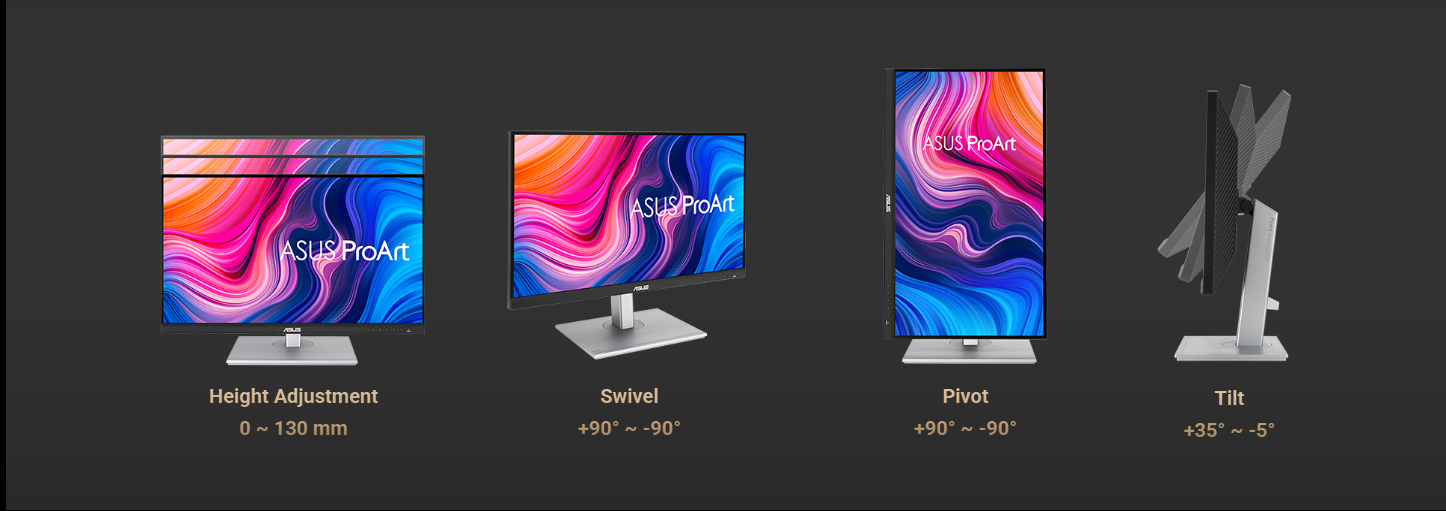
This matters more than it may seem on paper. A creator monitor is often used for long hours, and poor adjustability can become a real productivity issue. The PA247CV’s stand gives it a practical edge over many low-cost 24-inch displays that only tilt. If you work on image retouching, layout design, social media assets, spreadsheets, or code, being able to rotate and reposition the panel properly is a real advantage.
Display quality and color performance
The heart of the PA247CV is its 23.8-inch IPS panel with Full HD resolution and a 178-degree wide viewing angle. In 2026, some users may immediately ask whether 1080p is enough. The honest answer is that it depends on your work. For photo editing, web design, office content, Figma layouts, social media creation, video timelines, and general color-sensitive work, Full HD on a 23.8-inch panel is still quite usable. It is not as sharp as a 1440p or 4K monitor, but it remains comfortable for many workflows, especially when balanced against the price and feature set.
Where the PA247CV really stands out is color. ASUS specifies 100% sRGB and 100% Rec. 709 coverage, which makes it very suitable for web content, YouTube production, digital design, and general video work. ASUS also states the panel is factory calibrated and Calman Verified with Delta E below 2, which is exactly the kind of specification professionals look for when they need confidence in out-of-box accuracy. In practical terms, that means the monitor is designed to show colors very close to their intended values, reducing guesswork during editing and review.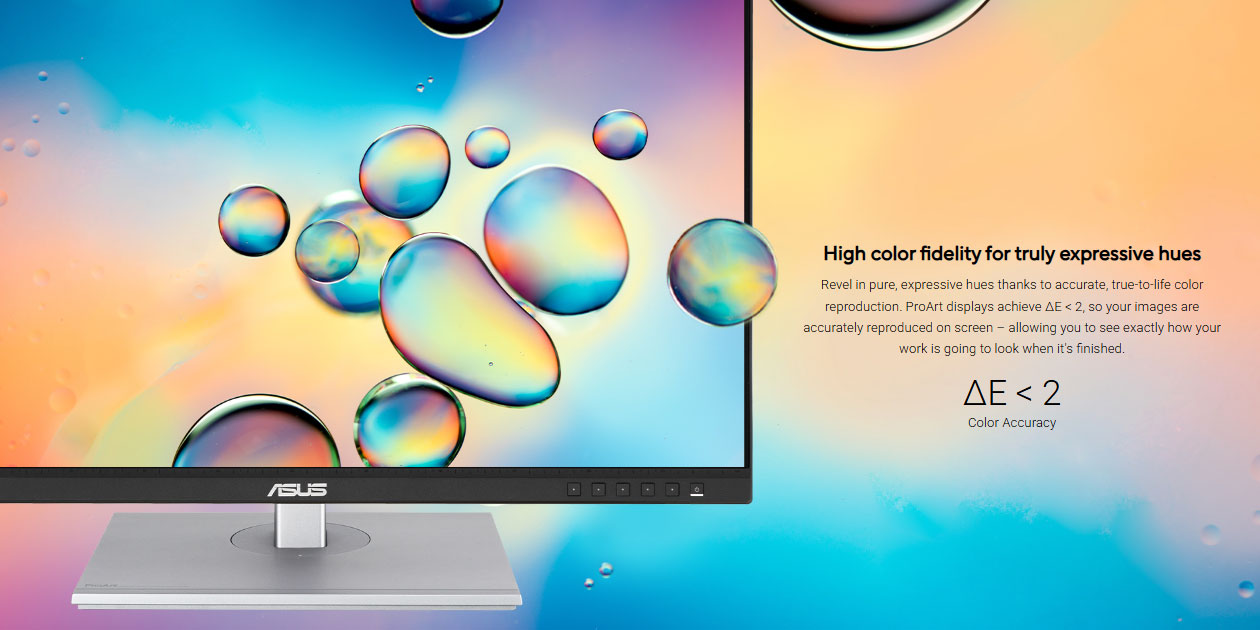
This is one of the strongest reasons to consider the PA247CV over a generic office IPS monitor. Many mainstream monitors look decent, but they are not necessarily tuned for color-critical work. The ProArt line is built around predictable, standards-based color behavior. On the PA247CV, that includes not just gamut coverage but also factory calibration, Calman verification, and access to ProArt Preset modes for fast color-space adjustment. ASUS highlights sRGB, Rec. 709, DCI-P3, Reading, Darkroom, and Rapid Rendering among the available preset-oriented workflow options shown on the product page.
ASUS also includes ProArt Palette, which lets users adjust color hue, temperature, gamma, and grayscale parameters through the on-screen display. This is especially helpful for users who need more control than a normal consumer monitor offers but do not necessarily want to jump into far more expensive broadcast or reference-class displays. ProArt Palette helps the PA247CV feel like a true work tool rather than simply a screen with a nice panel.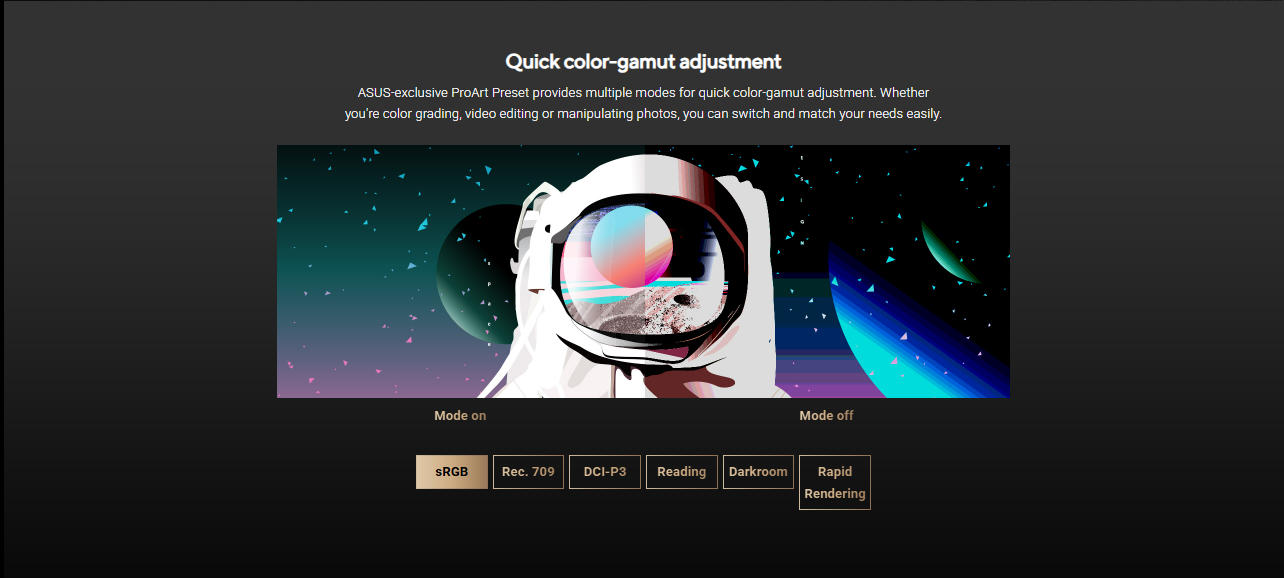
Benchmark chart
Below is a practical benchmark-style summary based on official ASUS and NationalPC specifications.
ASUS ProArt Display PA247CV Benchmark Chart
| Metric | ASUS PA247CV | Practical meaning |
|---|---|---|
| Screen size | 23.8-inch viewable / 24-inch class | Good desk-friendly size for workstations |
| Resolution | 1920 x 1080 | Suitable for general creative work and office productivity |
| Panel type | IPS, 178° viewing angle | Stable colors and wide viewing comfort |
| Color gamut | 100% sRGB, 100% Rec. 709 | Strong fit for web, design, and video workflows |
| Color accuracy | ΔE < 2 | Professional-grade color precision for this class |
| Calibration | Factory calibrated, Calman Verified | Reliable out-of-box color performance |
| Refresh rate | 75Hz | Smoother than standard 60Hz for daily use |
| Adaptive sync | 48–75Hz Adaptive-Sync | Reduced tearing in animated content and light gaming |
| USB-C power delivery | 65W | Useful single-cable connection for laptops |
| Connectivity | USB-C, DisplayPort, HDMI, USB hub | Excellent flexibility for creators and business users |
| Daisy chaining | DisplayPort MST | Cleaner multi-monitor setup option |
| Ergonomics | Height, tilt, swivel, pivot | Very strong usability for long work hours |
| Eye care | Flicker-Free, Low Blue Light | Better comfort for extended sessions |
| Store price | ₹19,490 | Competitive value in creator monitor category |
Connectivity and workspace convenience
One of the best things about the PA247CV is that ASUS did not treat connectivity as an afterthought. The integrated USB-C port supports data transfer, DisplayPort signal, and up to 65W power delivery over a single cable. That makes it ideal for modern laptops, especially MacBooks and Windows ultrabooks used in creative or office settings. A single cable can carry video, connect the monitor’s USB hub, and charge the laptop. That reduces clutter significantly.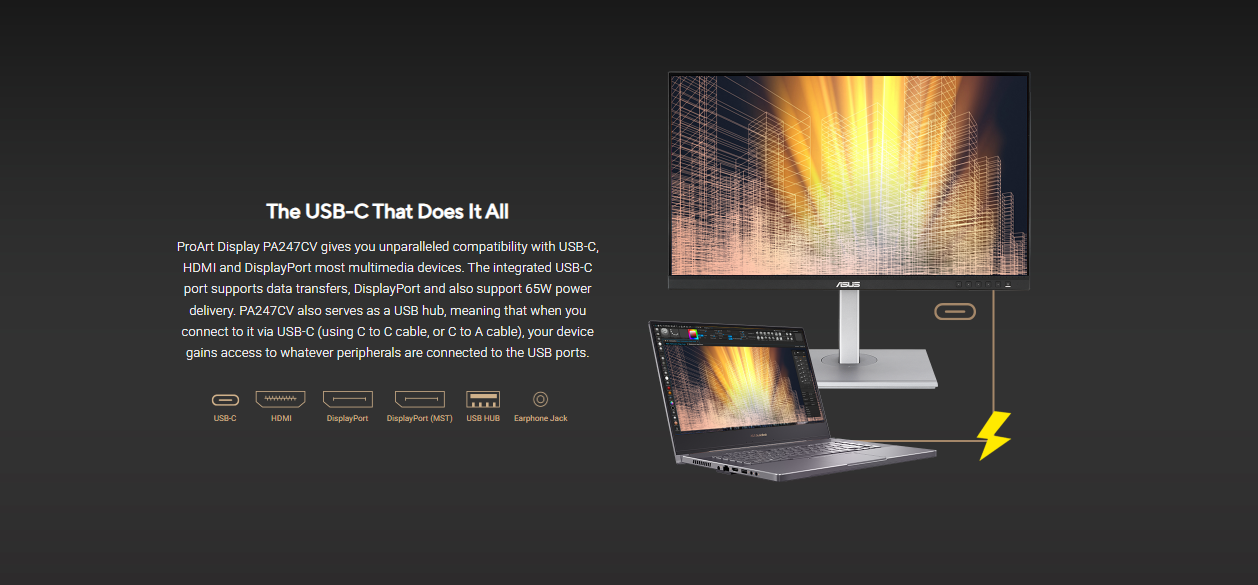
ASUS also includes HDMI, DisplayPort, DisplayPort MST for daisy-chaining, a USB hub, and an earphone jack. In real-world terms, this means the PA247CV can serve as the center of a clean workstation. You can plug in a laptop via USB-C, attach peripherals to the monitor, and expand into a second display more easily. That is the kind of feature set that makes a monitor genuinely productivity-friendly, especially in professional environments where desk simplicity matters.
For business users and creative studios, this level of connectivity is a real value add. Many monitors at similar prices may include USB-C, but not always with good power delivery, hub functionality, and creator-focused color support in the same package. The PA247CV does a good job of balancing those priorities.
Motion handling and everyday smoothness
The PA247CV is not a gaming monitor, but it is also not stuck at a basic 60Hz. ASUS specifies a 75Hz refresh rate and Adaptive-Sync support from 48 to 75Hz, which helps make animated content look smoother and can reduce tearing. That is useful not just for casual gaming, but also for scrolling, timeline movement, interface transitions, and previewing motion graphics or light video work.
This is an underrated advantage. A lot of creator monitors in the lower price bands still feel slightly rigid in day-to-day use because they stay at 60Hz only. The PA247CV’s 75Hz refresh rate will not transform it into a high-refresh gaming display, but it does make the experience feel more modern and fluid. For people who divide time between design work, browsing, office applications, and occasional entertainment, that smoother feel is welcome.
Tools for creators
ASUS has built the PA247CV around creator-oriented utility features, not just hardware specs. ProArt Preset allows quick switching between different visual modes, which is useful when moving between workflows. ProArt Palette gives deeper adjustment control. ASUS QuickFit Virtual Scale helps preview documents and artwork at real size using ruler, alignment, and layout overlays. These are the kinds of features that working professionals actually use, especially in print-oriented design and layout review.
ASUS also emphasizes that the PA247CV is designed for photo editing, video editing, and graphic design. That is reflected not only in the monitor’s marketing language but also in the actual feature choices: wide standard-gamut coverage, good calibration, flexible input options, and an ergonomic stand rather than flashy styling. It is a disciplined product, and that is exactly why it makes sense.
Eye comfort and long-session usability
 ASUS includes TÜV Rheinland-certified Flicker-Free and Low Blue Light technologies on the PA247CV. These features are important for users who spend all day in front of a monitor. While they do not directly affect color quality, they can make a meaningful difference in comfort over long sessions. Eye fatigue is a real issue in editing, office work, and creative production, and any display intended for professional use should take this seriously. ASUS does.
The combination of ergonomic flexibility and eye-care features makes the PA247CV particularly appealing as an all-day work monitor. For agencies, corporate departments, home offices, and creator desks, that matters just as much as color coverage. A monitor can be accurate and still become tiring to use if its ergonomics or flicker behavior are poor. The PA247CV aims to avoid that problem.
Who should buy it?
The PA247CV is ideal for designers, photographers, content creators, office professionals, editors, developers, and business users who want a color-accurate monitor with practical docking features. It is especially good for people using laptops, because USB-C with 65W power delivery makes the monitor much more convenient as a single-cable desk setup. It is also a strong fit for dual-monitor or multi-monitor workflows due to DisplayPort daisy-chaining support.
It is also a good option for buyers who want a professional display but do not need 4K, HDR mastering, or ultra-wide color spaces beyond mainstream creative standards. If your work is focused on web graphics, social content, YouTube, office presentations, documentation, business visuals, or standard video editing pipelines, the PA247CV offers a very balanced package.
Who may want something more?
Users who need sharper text and more workspace density may prefer a 1440p or 4K ProArt model. Similarly, users working in high-end HDR finishing or those who need stronger brightness and wider advanced gamut handling may want to move higher in ASUS’s ProArt range. If gaming is your primary concern, there are better high-refresh gaming monitors than this one. The PA247CV is strong because it stays focused, not because it tries to be everything.
Final verdict
The ASUS ProArt Display PA247CV is one of the most sensible professional monitors in its segment. It delivers the features that actually matter: accurate color, 100% sRGB and 100% Rec. 709 coverage, Delta E < 2 calibration, Calman Verified confidence, USB-C with 65W charging, a USB hub, daisy-chaining support, a fully ergonomic stand, and helpful creator tools like ProArt Preset, ProArt Palette, and QuickFit. It does not overreach, and that is part of its appeal.
At ₹19,490 on NationalPC, it looks like a strong value for creators, students in design fields, office professionals, and business buyers who want a reliable color-accurate monitor without paying flagship prices. For users who can live with Full HD at 23.8 inches, the PA247CV is a well-judged display that combines color trustworthiness, ergonomic comfort, and workspace convenience in a very practical way.
Q&A
Q1. Is ASUS ProArt PA247CV good for photo editing?
Yes. It offers 100% sRGB, 100% Rec. 709, factory calibration, and Calman Verified Delta E < 2 accuracy, making it well suited for photo editing and design work.
Q2. Is the PA247CV a 4K monitor?
No. It uses a Full HD 1920 x 1080 IPS panel in a 23.8-inch size.
Q3. Does it support USB-C laptop charging?
Yes. The USB-C port supports DisplayPort signal, data transfer, and up to 65W power delivery.
Q4. Is this monitor suitable for MacBook users?
Yes. Its USB-C connectivity and power delivery make it a practical single-cable solution for many MacBook-based desk setups. ASUS also highlights USB-C compatibility on the official page.
Q5. Can I use it in a dual-monitor setup?
Yes. It supports DisplayPort daisy-chaining via MST, which can simplify multi-monitor setups.
Q6. Is the PA247CV good for gaming?
It is not a gaming-first monitor, but the 75Hz refresh rate and Adaptive-Sync support make it better for casual gaming and smoother daily use than a standard 60Hz office monitor.
Q7. What is the biggest reason to buy this monitor?
The biggest reason is balance. You get professional-grade color accuracy, USB-C with 65W charging, ergonomic flexibility, and creator-focused tools at a reasonable price point.
Where to buy
You can buy the ASUS ProArt Display PA247CV Professional Monitor from NationalPC here:
ASUS ProArt Display PA247CV on NationalPC







