

ASUS ProArt Display OLED PA27USD Professional Monitor Review
A 27-inch 4K QD-OLED Reference-Style Monitor for Filmmakers, Colorists, Photographers & Creative Studios
The ASUS ProArt Display OLED PA27USD is not a normal 27-inch premium monitor. It is a specialist professional display built for creators who need OLED contrast, 4K detail, accurate color, hardware calibration, broadcast-grade 12G-SDI connectivity, HDR workflow support, and Thunderbolt 4 convenience in one compact screen. ASUS positions this model for filmmakers, video editors, colorists, digital imaging technicians, photographers, designers, 3D/VFX artists, and game developers. The official ASUS product page highlights a 26.5-inch 4K UHD QD-OLED panel, 240Hz refresh rate, 0.1ms GTG response time, 99% DCI-P3, Delta E < 1 color accuracy, built-in motorized colorimeter, 12G-SDI, HDMI 2.1, DisplayPort 2.1, and dual Thunderbolt 4 with up to 96W power delivery.
For Indian buyers, the ASUS ProArt Display OLED PA27USD is listed on NationalPC as a Pre-Booking | Exclusive model, with the product page showing a price of ₹2,29,990.00 at the time of checking. The page also mentions GST invoice availability, which makes it more practical for studios, production houses, agencies, and business buyers.
Key Highlights
26.5-inch 4K UHD QD-OLED Display: Enjoy professional-grade 3840 × 2160 resolution with QD-OLED technology for deep blacks, sharp details, rich colors, and cinematic contrast.
240Hz Refresh Rate with 0.1ms Response Time: Smooth rendering makes this monitor suitable not only for editing and grading, but also for game development, animation review, and motion-heavy creative workflows.
True 10-bit Color Depth: The PA27USD supports 1.07 billion colors, helping creators work with smoother gradients, cleaner tonal transitions, and better HDR color control.
99% DCI-P3 and 100% sRGB Coverage: Wide color gamut support makes it suitable for digital cinema, web content, photography, creative design, and professional video workflows.
Delta E < 1 Color Accuracy: ASUS factory calibrates the display for professional color accuracy, making it ready for serious creative work straight out of the box.
Built-in Motorized Colorimeter: Self and auto calibration help maintain long-term color consistency without depending fully on external calibration tools.
ProArt Hardware Calibration: Calibration profiles can be saved directly to the monitor’s internal scaler IC, so color settings remain with the monitor instead of being tied only to one computer.
12G-SDI Connectivity: The PA27USD supports uncompressed 4K@60Hz video input through 12G-SDI, making it highly valuable for broadcast, production, DIT, and on-set workflows.
HDR Support: Dolby Vision, HDR10, and HLG support make the monitor suitable for modern HDR content review and grading workflows.
Dual Thunderbolt 4 with 96W Power Delivery: Connect and charge compatible laptops through a single cable while also using the monitor as a professional display and hub.
Two Stand Options and Metal Handle: ASUS includes versatile stand options and a metal handle, making the PA27USD more flexible for desk setups, on-set usage, and portable professional workflows.
Monitor Hood Included: The bundled hood helps reduce reflections, which is important for color-critical editing and grading environments..webp)
.webp)
.webp)
Professional Review
1. Design & Professional Positioning
 The ASUS ProArt Display OLED PA27USD is designed with a clear purpose: it is a compact professional monitor for creators who want reference-style features without moving to a massive studio display. Unlike common 27-inch 4K monitors, this model includes features that are normally associated with high-end production environments: built-in calibration, 12G-SDI, HDR workflow support, Thunderbolt 4, monitor hood, and portable setup options.
The design is clean, premium, and practical. It is not a gaming-style monitor despite having a 240Hz refresh rate. It belongs to ASUS’s ProArt family, so the design language is more mature and studio-focused. The display is made to look professional on a colorist’s desk, a video editor’s table, a photography workstation, or a DIT cart.
One of the most interesting things about this monitor is its versatility. It can work as a desktop creator monitor, a broadcast workflow display, a MacBook companion monitor, a game development display, and a portable production monitor. ASUS specifically highlights different user groups, including filmmakers, video editors, colorists, DIT professionals, game developers, 3D/VFX artists, designers, and photographers.
The included monitor hood is a serious advantage for professional work. In color-sensitive environments, reflections can change the way contrast and color are perceived. A hood helps reduce ambient light interference and gives creators a more controlled viewing experience. Parka Blogs also noted that the anti-reflective coating is effective and that the shading hood can be installed or removed easily.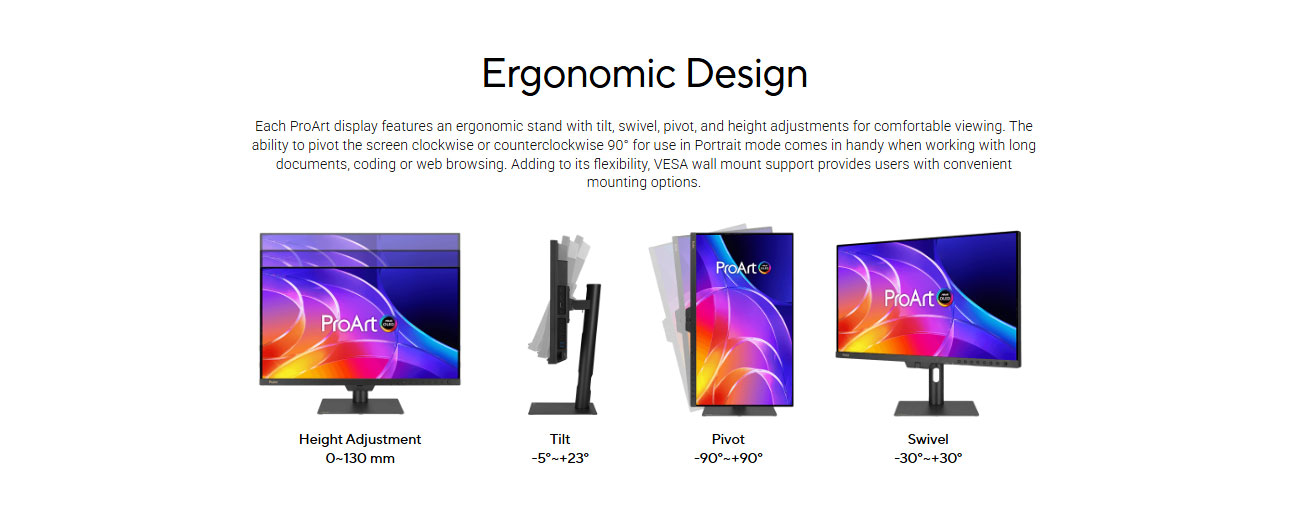
2. Display Quality: 4K QD-OLED for Serious Visual Work
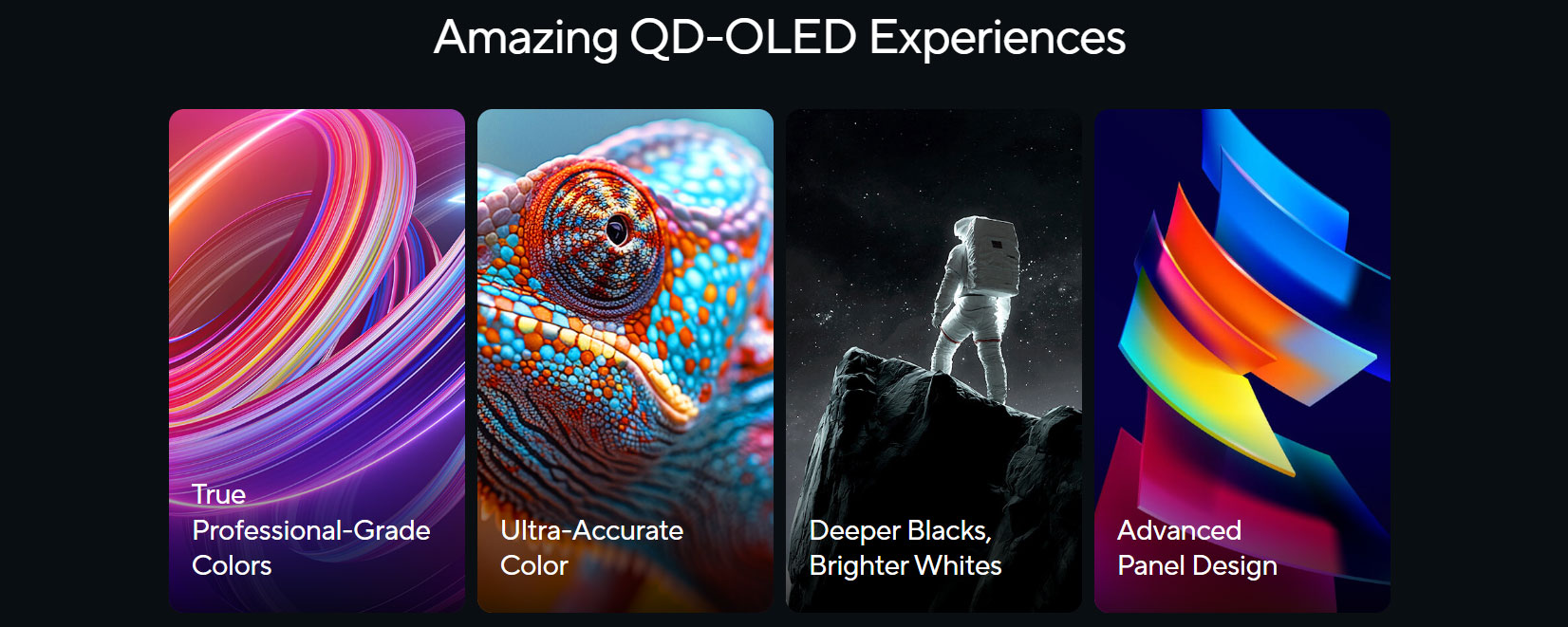 The PA27USD uses a 26.5-inch 4K UHD QD-OLED panel with a resolution of 3840 × 2160. On a 27-inch-class screen, 4K resolution gives excellent pixel density, making text, timelines, UI elements, photos, and video frames look extremely sharp. For creators, this matters because fine details in images, skin tones, textures, focus, noise, and compression artifacts become easier to judge.
QD-OLED technology is the main attraction. Compared to traditional LCD panels, OLED can deliver deeper blacks because pixels can turn off individually. This gives the PA27USD a very strong contrast advantage, especially in dark scenes, HDR grading, cinematic footage, night photography, and high-contrast product visuals. ASUS lists the monitor with a 1,500,000:1 contrast ratio, and Parka Blogs described the display quality as sharp, vibrant, bright, and visually stunning.
For editors and colorists, the big benefit is not only “beautiful picture quality.” It is the ability to judge black levels, highlight detail, shadow roll-off, and color separation more confidently. A standard IPS monitor may still be good for general editing, but OLED gives a different level of perceived contrast and black depth.
The PA27USD also supports true 10-bit color depth, which is essential for professional creative work. With 10-bit color, gradients can appear smoother and banding can be reduced, especially in skies, skin tones, product renders, and HDR footage. ASUS lists true 10-bit color depth and wide color support, while Parka Blogs also lists 1.0737 billion display colors.
3. Brightness & HDR Performance
ASUS officially lists the PA27USD with 1000 nits peak brightness and VESA DisplayHDR True Black 400 support. The monitor supports Dolby Vision, HDR10, and HLG, making it suitable for modern HDR review and production workflows.
Some media coverage mentions 1200 nits, including TechRadar’s article headline and summary, but for product content and ecommerce accuracy, it is safer to follow the official ASUS product listing, which states 1000 nits peak brightness.
The real strength of this monitor is not just raw brightness. It is the combination of OLED black level, HDR format support, color accuracy, and compact 4K sharpness. For video editors and colorists, HDR support is important because content is increasingly being delivered in HDR for streaming, cinema, YouTube, OTT platforms, and broadcast.
The PA27USD supports Dolby Vision, HDR10, and HLG, giving creators more flexibility depending on delivery format. HLG is relevant for broadcast-style HDR workflows, HDR10 is widely used for consumer HDR content, and Dolby Vision support adds value for professional mastering and preview environments. ASUS also says its Smart HDR technology enables support for these multiple HDR formats.
4. Color Accuracy & Calibration
Color accuracy is one of the most important reasons to buy this monitor. ASUS lists Delta E < 1 color accuracy, 99% DCI-P3, 100% sRGB, BT.2020 wide color gamut support, and factory calibration.
For professional use, Delta E matters because it measures the difference between intended color and displayed color. A lower Delta E means more accurate color reproduction. For many creative workflows, Delta E below 2 is considered good; ASUS is targeting a much stricter Delta E < 1 level.
The built-in motorized colorimeter is one of the most important features of the PA27USD. Many creators buy external calibration devices separately, but ASUS integrates a colorimeter directly into the monitor. This allows self calibration and auto calibration. ASUS says the self-calibration feature can work as a standalone solution, does not require extra calibration software, and can be scheduled through the OSD menu.
Even better, ASUS ProArt Hardware Calibration can save color parameters directly to the monitor’s internal scaler IC. This is important for studios where the same display may be connected to multiple computers. Instead of relying only on one computer’s ICC profile, the monitor itself stores the calibrated profile.
Parka Blogs measured 98% DCI-P3, which is close to ASUS’s advertised 99% DCI-P3, and described the color accuracy as fantastic and suitable for most color-critical work. The same review also noted that calibration took around eight minutes and that calibration data is stored on the monitor itself.
5. 12G-SDI: The Feature That Makes It Different
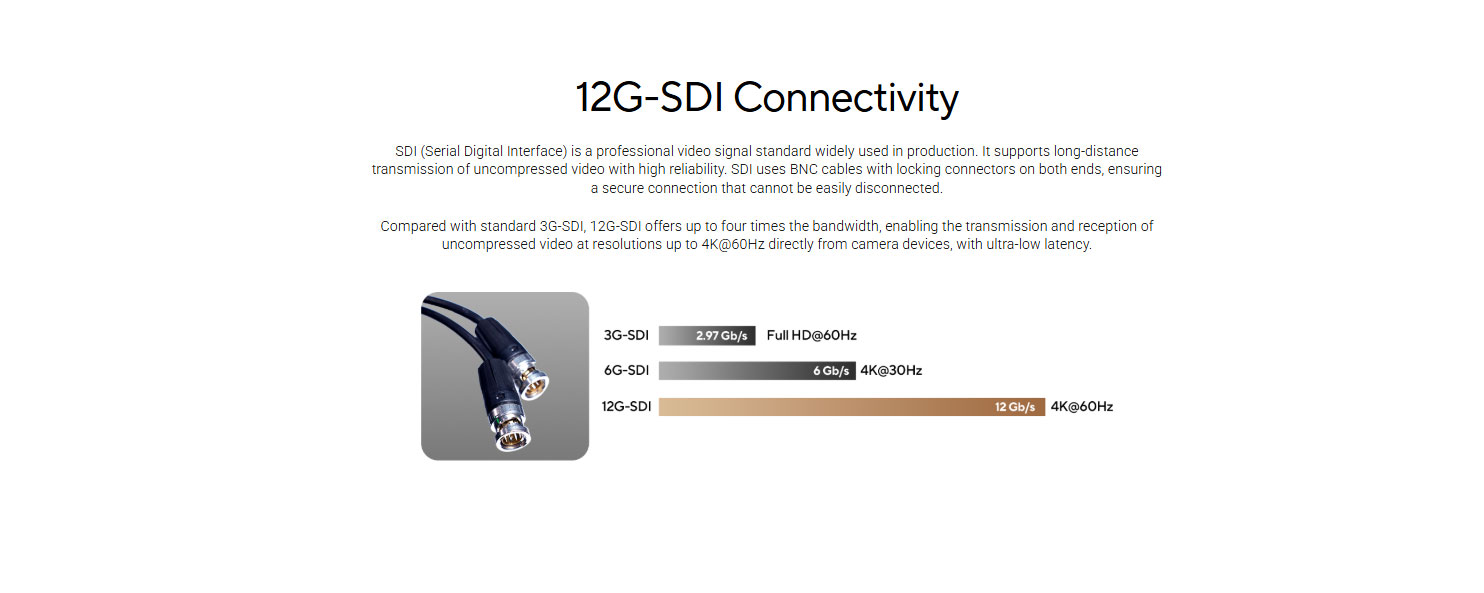 The most distinctive feature of the PA27USD is 12G-SDI. Many 27-inch professional monitors include HDMI, DisplayPort, and USB-C. Very few include SDI, especially in this category. ASUS states that the 12G-SDI port supports 4K@60Hz real-time playback without compression and is compatible with 6G and 3G Level A & B.
For filmmakers, broadcast engineers, colorists, and DIT professionals, this is a major feature. SDI is commonly used in professional video environments because it is reliable, supports long cable runs, and uses locking BNC connectors. Photo Review specifically explains that SDI is valuable because it can transmit uncompressed video over longer distances with high reliability, and the locking connectors help prevent accidental disconnection in busy professional workplaces.
This is why the PA27USD is more than just a creator monitor. It can sit inside a real production workflow. A camera output, capture device, broadcast switcher, or professional video pipeline can send a proper SDI signal directly into the monitor. For studios that already work with SDI equipment, this can reduce adapters, converters, and workflow complexity.
For normal users, SDI may not matter. For the right user, it can be the reason to buy this monitor.
6. Connectivity: Thunderbolt 4, HDMI 2.1, DisplayPort 2.1 & USB Hub
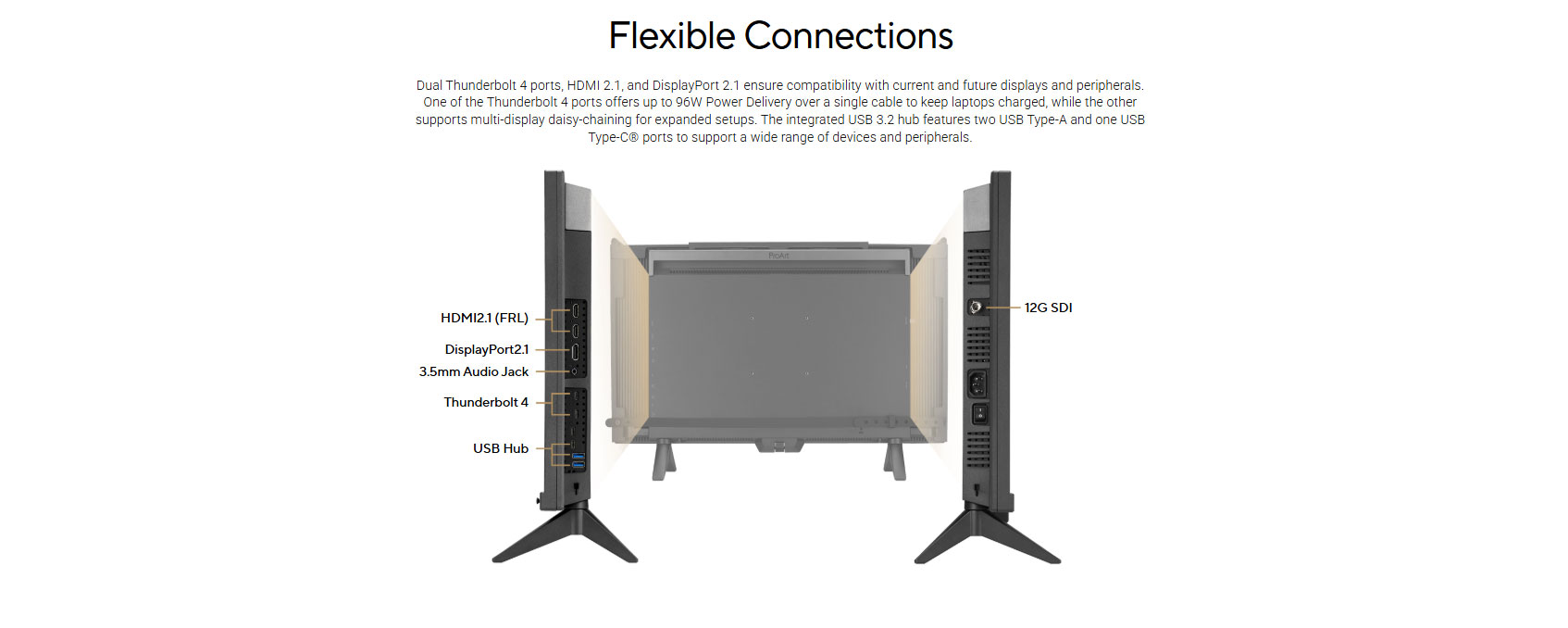 The PA27USD has a very strong connection layout. ASUS lists 12G-SDI, dual Thunderbolt 4 with up to 96W Power Delivery, HDMI 2.1, DisplayPort 2.1, and a built-in USB hub.
For MacBook Pro, Mac mini, Windows workstation, editing laptop, and production desk users, Thunderbolt 4 is especially useful. With a compatible laptop, one cable can carry display signal, data, and charging. Photo Review notes that the Thunderbolt 4 ports provide up to 96W power delivery, allowing a laptop to be powered, charged, and connected through a single cable.
This is excellent for creators who want a clean desk setup. A MacBook Pro user, for example, can connect through Thunderbolt 4 and use the PA27USD as a main editing display while charging the laptop at the same time. The built-in USB hub also helps connect accessories such as keyboard, mouse, storage, card reader, control surface, or calibration tools.
HDMI 2.1 and DisplayPort 2.1 are also important because they support high-bandwidth display input, including high refresh rate 4K workflows. ASUS states that HDMI 2.1, DisplayPort 2.1, and Thunderbolt 4 connectivity support 4K@240Hz.
7. 240Hz Refresh Rate: Not Just for Gaming
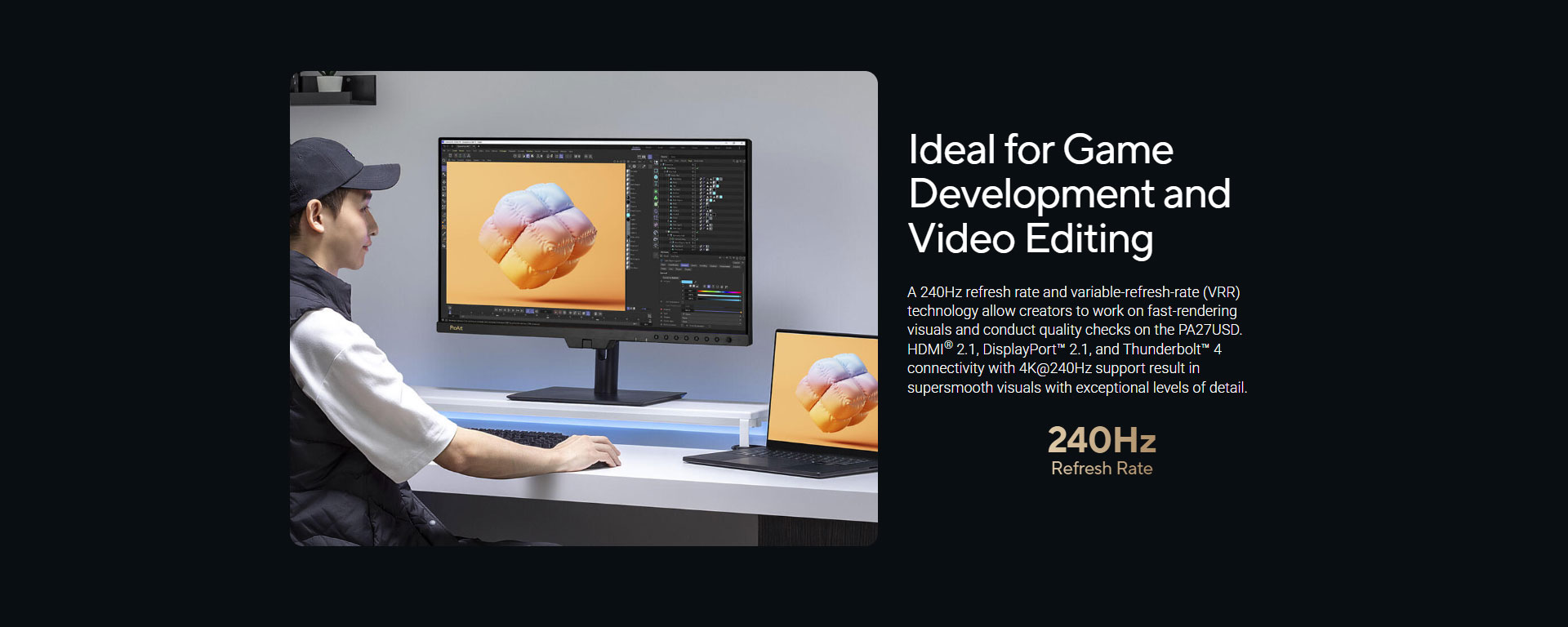
A 240Hz refresh rate on a professional creator monitor may sound unusual, but it makes sense for several workflows. ASUS says the 240Hz refresh rate and variable refresh rate technology allow creators to work on fast-rendering visuals and conduct quality checks.
For game developers, this is obvious. They can test motion, UI transitions, animation responsiveness, and high-frame-rate gameplay on the same monitor used for color-accurate artwork. For VFX artists and animators, smoother playback can make motion review more comfortable. For video editors, the refresh rate is not always essential for final delivery, but it improves the overall user experience when scrubbing timelines, moving windows, and working in motion-heavy software.
The 0.1ms GTG response time also makes the panel extremely fast. This reduces motion smearing and helps the monitor feel very responsive. Parka Blogs also noted that the monitor can be used for gaming and designing games because of its response time and refresh rate.
This does not mean the PA27USD is a gaming monitor first. It is still a professional ProArt monitor. But it has enough speed to satisfy creators who also develop or review interactive content.
8. OLED Care & Burn-in Protection
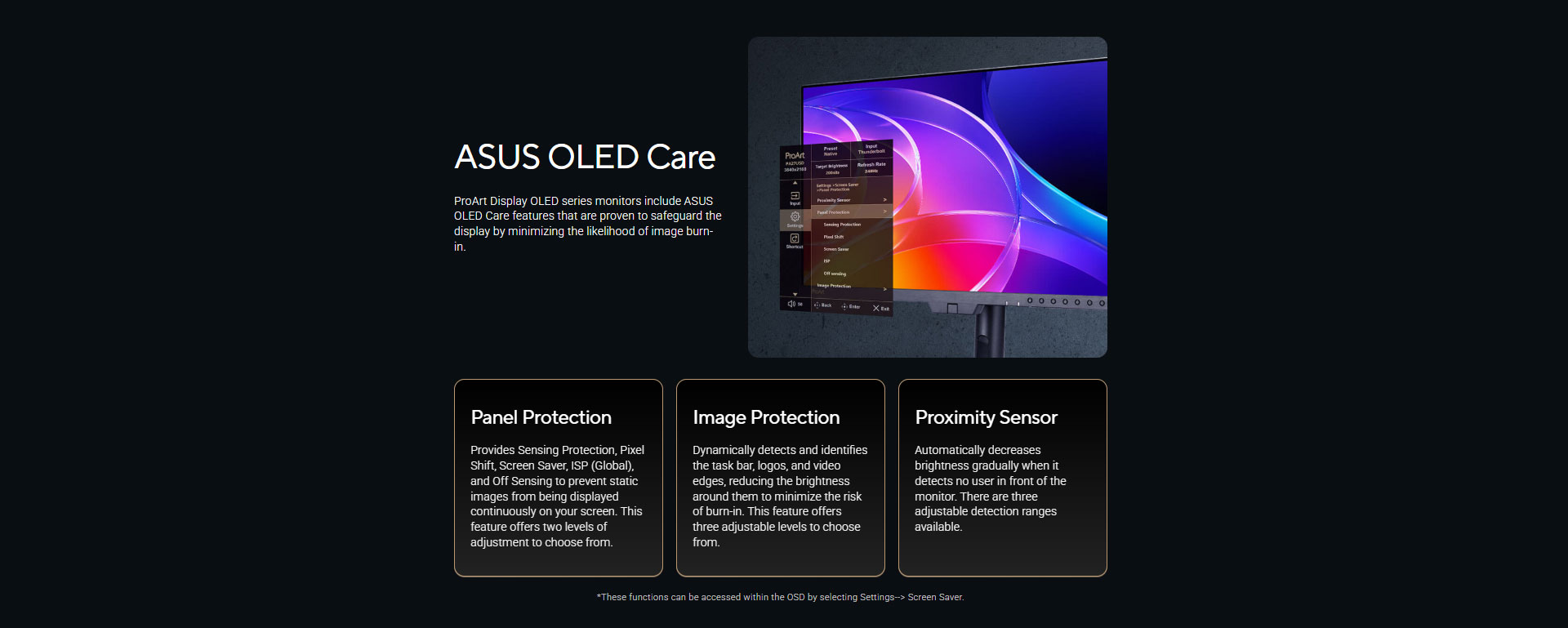 OLED monitors have one major concern: burn-in. ASUS addresses this with ASUS OLED Care features. The official page lists panel protection, image protection, and proximity sensor features designed to minimize burn-in risk.
ASUS describes panel protection features such as sensing protection, pixel shift, screen saver, ISP Global, and off sensing. Image protection can detect elements such as taskbars, logos, and video edges, reducing brightness around them to help lower burn-in risk. The proximity sensor can automatically reduce brightness when no user is detected.
For professionals, this is important because editing software often has static UI elements: timelines, panels, toolbars, waveform scopes, menus, color wheels, and taskbars. OLED Care does not remove burn-in risk completely, but it provides practical safeguards.
Parka Blogs also discussed OLED protection features and noted that some protection behavior may be visible or distracting in certain cases, but the settings can be adjusted through the OSD.
9. Uniform Brightness for More Stable Work
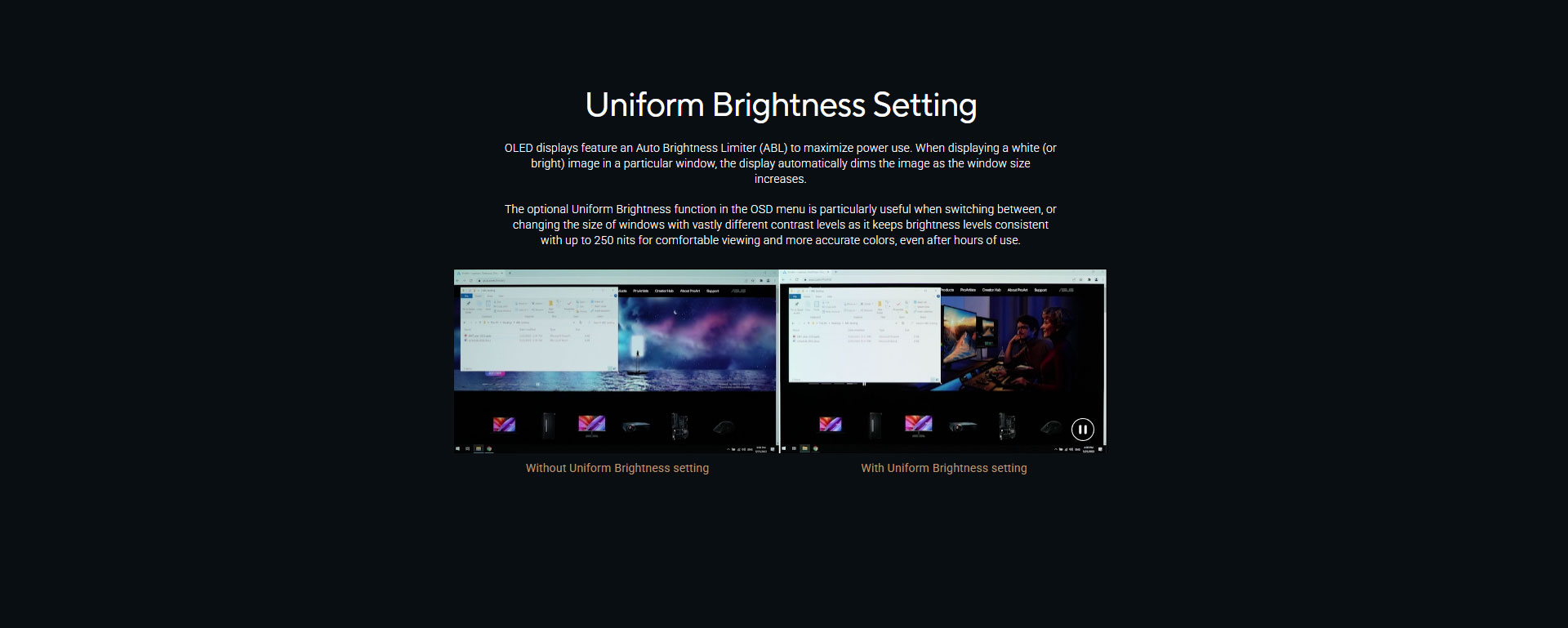 OLED displays often use an Auto Brightness Limiter, which can dim the image when large bright areas appear. ASUS includes a Uniform Brightness setting to keep brightness more consistent when switching between windows or changing window sizes. ASUS says this setting can maintain brightness consistency up to 250 nits, which is useful for comfortable viewing and more accurate color over long sessions.
For creators, this is useful because sudden brightness shifts can affect judgment. If you are editing a white-background product photo, switching to a dark video scene, then returning to a bright web layout, inconsistent brightness can be distracting. Uniform Brightness helps make the display feel more predictable for SDR work.
10. Real-World Professional Workflow Suitability
For Filmmakers & Video Editors
The PA27USD is one of the most filmmaker-focused 27-inch monitors available because it combines 4K QD-OLED, HDR support, 12G-SDI, Delta E < 1 accuracy, and calibration hardware. ASUS specifically presents it as suitable for 4K HDR content production.
For editors working in DaVinci Resolve, Premiere Pro, Final Cut Pro, Avid, or similar software, the display gives a strong combination of sharpness, contrast, HDR format support, and connectivity.
For Colorists
Colorists benefit from accurate color, OLED black depth, HDR preview support, and hardware calibration. The built-in colorimeter helps maintain accuracy over time, while 12G-SDI makes it easier to connect professional video pipelines.
For Photographers
Photographers get 4K sharpness, wide gamut color, excellent contrast, and strong factory calibration. The only caution is Adobe RGB. Parka Blogs measured Adobe RGB at 91%, and noted that it may not be ideal for users who specifically need higher Adobe RGB coverage.
For Designers
Designers will appreciate sharp 4K detail, rich colors, and Thunderbolt convenience. The monitor is excellent for UI design, branding, product visualization, and digital content creation.
For DIT & On-Set Work
The PA27USD is unusually practical for DIT work because it includes 12G-SDI, a mini stand option, a monitor hood, and a portable-friendly design. ASUS specifically says 12G-SDI makes it suitable for on-set production workflows.
For Game Developers
Game developers get 4K detail, wide gamut color, 240Hz refresh rate, VRR support, and fast response. This allows one monitor to handle art review, motion testing, and gameplay quality checks.
Benchmark-Style Performance Chart
| Performance Area | Rating | Professional Impact |
|---|---|---|
| 4K Sharpness | 9.5/10 | Excellent for editing, design, photography, and timeline work |
| OLED Contrast | 10/10 | Deep blacks and cinematic contrast for HDR and grading |
| Color Accuracy | 9.5/10 | Delta E < 1 factory calibration supports professional workflows |
| HDR Capability | 9/10 | Dolby Vision, HDR10, HLG, OLED blacks, and high peak brightness |
| Connectivity | 10/10 | 12G-SDI, Thunderbolt 4, HDMI 2.1, DisplayPort 2.1, USB hub |
| Calibration Features | 10/10 | Built-in colorimeter, self/auto calibration, hardware calibration |
| Motion Performance | 9.5/10 | 240Hz and 0.1ms response are excellent for fast visuals |
| Portability | 8.5/10 | Handle, short stand, and hood make it more production-friendly |
| Value for General Users | 7/10 | Expensive if SDI/calibration features are not needed |
| Value for Professionals | 9/10 | Strong feature set for studios and serious creators |
Advantages & Limitations
Advantages
Professional 4K QD-OLED Panel: The 26.5-inch 4K QD-OLED panel delivers deep blacks, crisp detail, and strong contrast for serious creative work.
Excellent Color Accuracy: Delta E < 1 factory calibration makes it suitable for color-critical production, design, photography, and video editing.
Built-in Motorized Colorimeter: Self and auto calibration reduce dependence on external calibration tools and help maintain consistency over time.
12G-SDI Support: Broadcast-grade SDI input makes this monitor highly useful for filmmaking, production, DIT, and color grading workflows.
Rich HDR Format Support: Dolby Vision, HDR10, and HLG support give creators flexibility for modern HDR content workflows.
Thunderbolt 4 with 96W Power Delivery: A single cable can connect and charge compatible laptops, making the setup cleaner and more efficient.
240Hz Refresh Rate: Smooth motion performance supports game development, animation review, VFX work, and high-refresh creative workflows.
Monitor Hood Included: The hood helps reduce reflections and improves viewing control in bright or mixed-light environments.
OLED Care Protection: ASUS includes burn-in reduction features such as panel protection, image protection, and proximity sensing.
Listed on NationalPC: Indian buyers can purchase or pre-book the monitor from NationalPC with GST invoice support.
Limitations
Premium Pricing: At ₹2,29,990 on NationalPC at the time of checking, this is a high-end professional investment, not a casual monitor purchase.
Not Every User Needs 12G-SDI: SDI is extremely useful for production workflows, but regular office, gaming, and casual editing users may never use it.
OLED Burn-in Requires Care: ASUS includes OLED Care features, but users still need sensible habits when working with static UI elements for long hours.
Adobe RGB May Not Be Its Strongest Area: Parka Blogs measured Adobe RGB at 91%, so users who mainly need very high Adobe RGB coverage for print workflows should evaluate carefully.
Mac Scaling May Need Adjustment: Parka Blogs noted that macOS UI scaling on 27-inch 4K displays may not work perfectly for every user and may require tools or settings adjustment.
Overkill for Normal Users: If your work does not require SDI, hardware calibration, HDR grading, or color-critical accuracy, a lower-priced ProArt or OLED monitor may be more practical.
Specification Overview
| Feature | ASUS ProArt Display OLED PA27USD |
|---|---|
| Screen Size | 26.5-inch viewable |
| Resolution | 3840 × 2160, 4K UHD |
| Panel Type | QD-OLED |
| Refresh Rate | 240Hz |
| Response Time | 0.1ms GTG |
| Color Depth | True 10-bit |
| Color Gamut | 100% sRGB, 99% DCI-P3, BT.2020 wide gamut |
| Color Accuracy | Delta E < 1 |
| HDR Support | Dolby Vision, HDR10, HLG |
| Peak Brightness | 1000 nits official ASUS listing |
| Professional Video Input | 12G-SDI |
| Other Inputs | HDMI 2.1, DisplayPort 2.1, Thunderbolt 4 |
| Power Delivery | Up to 96W via Thunderbolt 4 |
| Calibration | Built-in motorized colorimeter, self/auto calibration |
| Software Support | ProArt Calibration, Calman Ready, ColourSpace Integration |
| Extra Features | Monitor hood, two stand options, metal handle, cable clips |
| NationalPC Status | Pre-Booking |
| NationalPC Price Seen | ₹2,29,990.00 |
Q&A Section
Q1. Is the ASUS ProArt Display OLED PA27USD good for professional video editing?
Yes. It is built for professional video workflows with 4K QD-OLED image quality, Delta E < 1 accuracy, HDR support, built-in calibration, and 12G-SDI connectivity. These features make it suitable for editors, colorists, filmmakers, and DIT professionals.
Q2. Does the PA27USD support 12G-SDI?
Yes. ASUS lists 12G-SDI support for 4K@60Hz real-time uncompressed playback, with compatibility for 6G and 3G Level A & B.
Q3. Is this monitor suitable for photographers?
Yes. The 4K resolution, OLED contrast, wide color gamut, Delta E < 1 accuracy, and calibration features make it highly suitable for professional photo editing. However, users who mainly work in Adobe RGB-heavy print workflows should note that one review measured Adobe RGB at 91%.
Q4. Does it have a built-in color calibrator?
Yes. The PA27USD includes a built-in motorized colorimeter for self and auto calibration. ASUS says calibration can be scheduled and can operate as a standalone solution through the OSD menu.
Q5. Does it support Dolby Vision?
Yes. ASUS lists Dolby Vision, HDR10, and HLG support for the PA27USD.
Q6. Is it good for MacBook users?
Yes. The monitor includes Thunderbolt 4 with up to 96W power delivery, making it convenient for MacBook users who want single-cable display and charging. ASUS also highlights Mac compatibility features through DisplayWidget Center for macOS.
Q7. Can this monitor be used for gaming?
Technically, yes. It has 240Hz refresh rate and 0.1ms response time, so it is very fast. But it is designed primarily as a professional creator monitor, not a gaming monitor. It is better suited for game developers than casual gamers.
Q8. Is the PA27USD overkill for normal office use?
Yes. For normal browsing, Excel, email, and office work, it is far more advanced than necessary. Its value is strongest for professional color, video, photography, HDR, broadcast, and studio workflows.
Q9. What is the price in India?
NationalPC lists the ASUS ProArt Display OLED PA27USD at ₹2,29,990.00 at the time of checking, with Pre-Booking | Exclusive status.
Q10. Where can I buy the ASUS ProArt Display OLED PA27USD in India?
You can buy or pre-book the ASUS ProArt Display OLED PA27USD 27-inch Professional Monitor from NationalPC. The NationalPC product listing shows the model with GST invoice support and pre-booking status.
Final Verdict
The ASUS ProArt Display OLED PA27USD is a serious professional monitor for serious creators. Its strength is not just one specification, but the combination of 4K QD-OLED image quality, true 10-bit color, Delta E < 1 accuracy, built-in motorized calibration, HDR support, 12G-SDI, Thunderbolt 4, HDMI 2.1, DisplayPort 2.1, monitor hood, and portable-friendly design.
For filmmakers, colorists, DIT professionals, HDR video editors, and creative studios, this monitor offers a rare mix of compact size and production-grade features. The 12G-SDI input alone makes it different from most premium 27-inch monitors, while built-in calibration makes it easier to maintain consistent color over time.
It is expensive, and it is not for everyone. But for professionals who can use its SDI, HDR, calibration, and OLED strengths, the PA27USD is one of the most complete 27-inch creator monitors currently available.
Overall Rating: 9.3/10
Where to Buy
Buy / Pre-Book from NationalPC:
ASUS ProArt Display OLED PA27USD 27-inch Professional Monitor
Current NationalPC listing: Pre-Booking | Exclusive
Pre-Booking Link:
https://nationalpc.in/monitors/asus-proart-display-oled-pa27usd
Price shown at time of checking: ₹2,29,990.00
Business buyers can also benefit from GST invoice support shown on the product listing.







