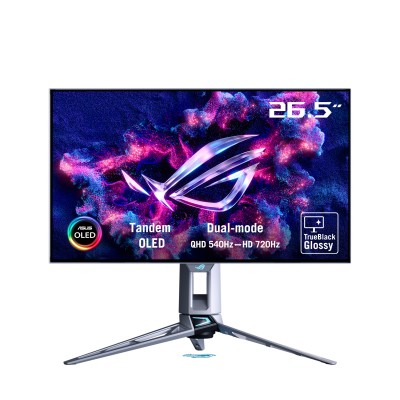
Tandem OLED: ASUS ROG Swift OLED PG27AQWP-W Review: 540Hz QHD (and 720Hz Mode) — The Motion-Clarity Monster for Esports
The “fastest OLED” era is real — and this one goes all-in
If you’re chasing maximum motion clarity for competitive shooters, ASUS built the ROG Swift OLED PG27AQWP-W to be the “no-compromise” answer: QHD (2560×1440) at up to 540Hz, plus a second mode: 720p at 720Hz for the absolute highest refresh-rate bragging rights.
But refresh rate is only half the story. The PG27AQWP-W uses ASUS “Tandem OLED” with a TrueBlack Glossy finish, aiming to improve perceived contrast and boost brightness/color volume versus older OLED implementations.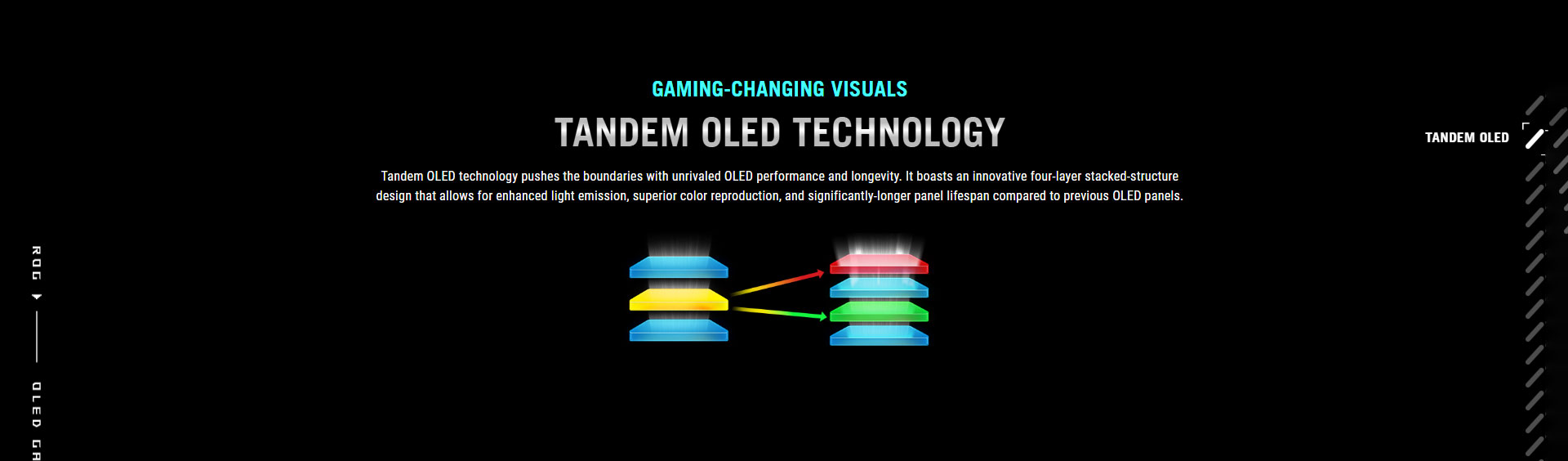
Key highlights (why this monitor is special)
Dual Mode refresh: 540Hz @ 1440p or 720Hz @ 720p
TrueBlack Glossy™ / “zero-haze” look for punchier perceived contrast
DisplayPort 2.1a UHBR20 (80Gbps) + HDMI 2.1, built for high refresh + modern GPUs
OLED Care Pro + Neo Proximity Sensor to help reduce burn-in risk
VESA DisplayHDR True Black 500 class HDR support
Specification sheet (quick view)
Model: ROG Swift OLED PG27AQWP-W
Screen size: 26.5" viewable (marketed as 27")
Resolution: 2560×1440 (QHD)
Refresh rate: 540Hz (QHD) / 720Hz (HD 1280×720)
Response: 0.02ms GTG (claimed)
HDR: VESA DisplayHDR 500 True Black
Ports: DP 2.1 / 2× HDMI 2.1 / USB hub / 3.5mm out (varies by region)
Important note (panel naming confusion online): Some coverage labels this display as “QD-OLED,” but ASUS positions it as Tandem OLED / WOLED-based (with Tandem tech). PCWorld explicitly describes two LG WOLED layers.
Benchmarks (real-world measurements snapshot)
Below are review-lab style datapoints pulled from major publications. Different sites use different window sizes/settings, so treat them as directional rather than absolute.
| Metric | Result (measured) | What it means |
|---|---|---|
| SDR brightness (sustained) | 316 nits (max sustained) | Strong for OLED for typical rooms |
| SDR peak (test window) | ~544 nits (25% window) / ~360 nits (full field) | Very bright OLED behavior for mixed scenes |
| HDR peak (test window) | ~651 nits (25% window, with Adjustable HDR maxed) | HDR highlights pop more when tuned correctly |
| Color gamut (lab test) | 99% DCI-P3 (PCWorld) | Wide gamut, great for games + creator work |
| Color volume / accuracy (lab test) | 108.58% DCI-P3 volume, ~1.98 dE color error | Excellent color performance in testing |
| Input lag (lab test) | 22ms average (Tom’s Hardware test) | Still “fast,” but note debate on methodology |
Motion clarity reality-check: PCWorld’s take is blunt: at this level, 540Hz looks near-perfect, and 720Hz is hard to “see” as a big upgrade unless you’re hyper-sensitive to latency and can actually drive the frames.
Gaming experience: who should buy this?
Buy it if you are:
A competitive FPS / esports player who prioritizes clarity + responsiveness over resolution.
Running a high-end GPU/CPU that can push very high frame rates at 1440p.
An OLED fan who wants glossy “TrueBlack” visuals and doesn’t mind managing reflections.
Skip it (or consider alternatives) if:
You mostly play cinematic AAA at high settings and would rather have 4K 240Hz OLED for better sharpness.
Your room is bright and you hate glare — glossy panels reflect more.
OLED care and burn-in: practical tips
This monitor includes ASUS OLED protection features (including proximity sensing), but OLED is still OLED. If you’re using it for work + gaming:
Enable pixel refresh / panel care prompts
Hide taskbar + use a rotating wallpaper
Avoid leaving static UI at high brightness for long periods
SKU / UPC / MPN (for cataloging)
SKU/Model: PG27AQWP-W
MPN (Part No.): 90LM0CF2-B01971
UPC: 471163616920
Buy Now (NationalPC CTA)
Buy ASUS ROG Swift OLED PG27AQWP-W from NationalPC — built for esports-grade motion clarity.
Limited stock: Order today for faster delivery.
Check Availability / Buy Now: https://nationalpc.in/monitors/asus-rog-swift-qhd-oled-pg27aqwp-w-27inch-gaming-monitor
Q&A (Google AI search friendly)
Q1) What’s the main advantage of PG27AQWP-W over 240Hz or 360Hz monitors?
Motion clarity. At 540Hz, moving targets and fast pans stay more readable, and OLED pixel response avoids LCD-style smearing.
Q2) Does 720Hz mode make a big difference?
It depends. The monitor can run 720Hz at 1280×720, but reviewers note the sharpness drop is obvious, and the clarity gain may be subtle versus 540Hz.
Q3) Is this QD-OLED or WOLED?
ASUS markets it around Tandem OLED / TrueBlack Glossy, and PCWorld describes it as using two LG WOLED layers. Some coverage called it “QD-OLED,” but that’s disputed.
Q4) How bright is it in real use?
PCWorld measured 316 nits sustained SDR, while Tom’s reported ~544 nits SDR peak (25% window) and ~360 nits full-screen. Expect strong OLED brightness, but glossy reflections matter.
Q5) Does it have DisplayPort 2.1a UHBR20 (80Gbps)?
ASUS highlights DisplayPort 2.1a UHBR20 with full 80Gbps bandwidth for high refresh support.
Q6) Is it good for content creation too?
Yes, if you’re comfortable with OLED workflow. Review testing shows strong gamut coverage and solid accuracy potential, plus an sRGB workflow is feasible.
Q7) What’s the “one-line verdict”?
If you want the cleanest motion you can buy in 27-inch QHD, this is one of the most extreme monitors available — built for high-FPS players first.