
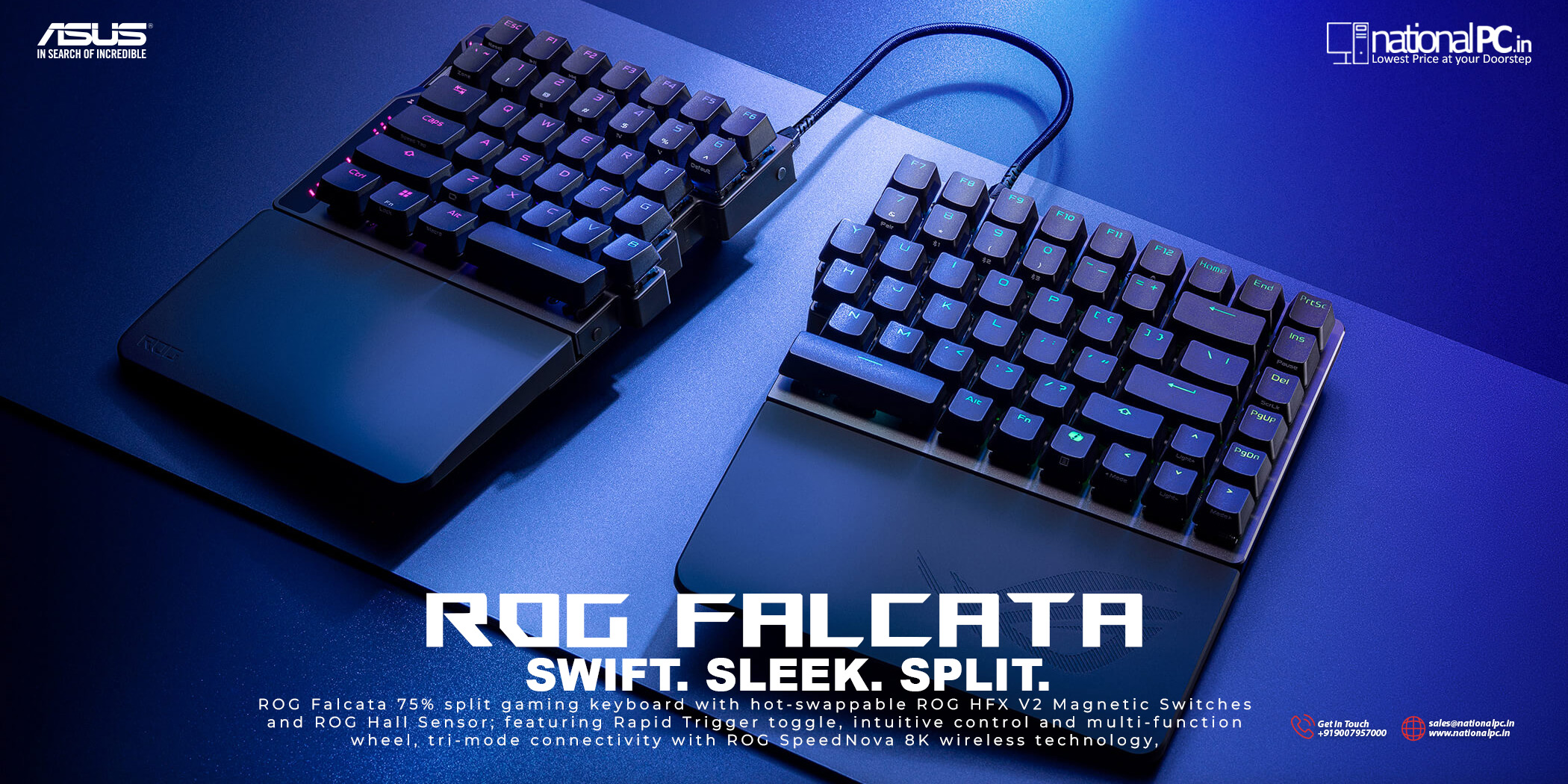
ASUS ROG Falcata Review: Split 75% Hall-Effect 8K Keyboard
If you’ve been watching the Hall-effect keyboard wave, the ROG Falcata is one of the most ambitious entries: a 75% split layout built for competitive play, with hot-swappable ROG HFX V2 magnetic switches, a dedicated Rapid Trigger toggle, and SpeedNova 8K wireless (8,000Hz polling in wired + 2.4GHz). This isn’t a “normal mechanical keyboard upgrade”—it’s a tunable input device aimed at players who care about movement precision, fast reset behavior, and mouse space.
What’s new and why it matters
1) Split 75% layout: more mouse room without losing essentials
Falcata keeps the core 75% layout advantages—compact footprint, dedicated arrow cluster, function row—while adding a split design so you can position the halves to suit your desk. For competitive FPS players, that extra mouse space and angle freedom can matter more than most people expect.
2) Magnetic (Hall-effect) switches with fine tuning
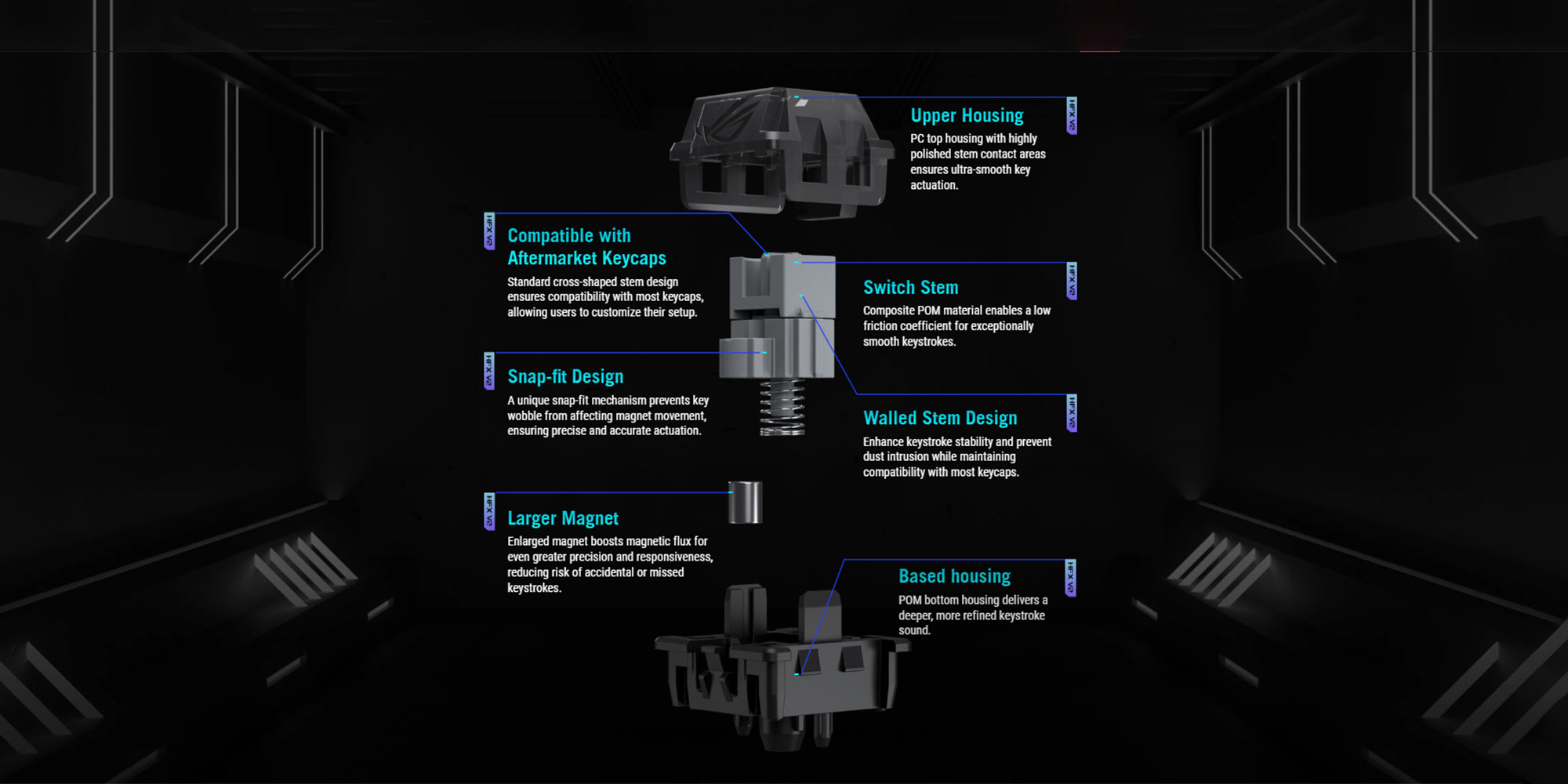 Hall-effect switches detect travel via magnets and sensors rather than metal contact points. The big benefit is control:
-
Adjustable actuation (how far you press before a key triggers)
-
Adjustable reset / rapid trigger behavior (how quickly a key “releases” and can re-trigger)
-
The ability to tune movement keys differently from typing keys
ROG Falcata’s HFX V2 magnetic switch tuning range is wide, so you can run ultra-shallow actuation for WASD while keeping safer, deeper actuation for typing to avoid accidental inputs.
3) 8,000Hz polling in wired + SpeedNova wireless
8K polling reduces the report interval compared to 1000Hz. It doesn’t “solve latency” by itself (game engine + system + display still matter), but it can shave small, measurable time off the keyboard-to-PC input path. Combine that with rapid trigger tuning and you get the real benefit: faster and more consistent re-triggering during movement corrections and strafes.
Specifications (quick table)
| Spec | ASUS ROG Falcata |
|---|---|
| Form factor | 75% split |
| Switch type | ROG HFX V2 Magnetic (Hall-effect), hot-swappable |
| Actuation tuning | 0.1–3.5mm, 0.01mm steps |
| Rapid Trigger | Dedicated toggle; typically enabled for WASD by default |
| Speed Tap mode | Prioritizes last input on opposing keys (A + D / W + S style behavior) |
| Connectivity | USB (wired), 2.4GHz (SpeedNova), Bluetooth; multi-device support |
| Polling rate | Up to 8,000Hz (wired / 2.4GHz) |
| Battery (claimed) | Up to ~200 hours (depends on lighting and mode) |
| Software | Web-based configuration (Gear Link) |
.jpg) Benchmark-style performance: what to test (and what to expect)
Benchmark-style performance: what to test (and what to expect)
This is how you evaluate Falcata like a competitive peripheral—repeatable tests instead of vague impressions.
1) Polling consistency (wired vs 2.4GHz vs Bluetooth)
How to test: run a polling-rate checker for 60 seconds in each mode.
What to expect: wired and 2.4GHz should show high polling behavior; Bluetooth is typically lower and optimized for convenience rather than peak competitive performance.
What matters most: stability (consistent reporting) beats occasional peaks.
2) Keystroke latency (press-to-OS event)
How to test: high-speed video comparing physical key motion to an on-screen response indicator.
What to expect: compared to 1000Hz keyboards, 8K can reduce the report interval. The improvement is usually small in absolute time, but competitive players notice consistency—especially when combined with rapid trigger tuning.
3) Rapid Trigger / reset behavior (the real advantage)
Why it matters: rapid trigger lets the key reset as soon as it starts moving upward—so you don’t need to fully release the key for the next input.
How to test:
-
Counter-strafe drills (A/D transitions) in your main FPS
-
Repeated tap bursts (10 seconds) comparing conservative vs aggressive settings
-
Misfire rate while typing after tuning
What to expect: aggressive actuation + rapid trigger can cause accidental inputs until you tune dead zones/sensitivity properly. Once dialed in, movement feels sharper and re-triggering becomes more controllable.
Recommended tuning profiles (starting points)
Competitive FPS (WASD focus)
-
Enable Rapid Trigger for WASD first
-
Keep actuation very shallow on movement keys
-
Use slightly deeper actuation for typing keys and modifiers
-
If you enable “Speed Tap” style behavior, verify it’s allowed in your play environment (custom rules/tournaments vary)
Mixed use (gaming + office)
-
Avoid ultra-shallow actuation on alphas
-
Use rapid trigger only where it helps (movement + a few action keys)
-
Keep a “work profile” and “game profile” so you don’t fight your keyboard during typing
Ergonomics: split doesn’t automatically mean “full ergonomic”
Falcata’s split design is excellent for desk space and positioning, but it may not replace a dedicated ergonomic split keyboard with aggressive tenting and wide separation. If your primary goal is wrist/shoulder comfort for long typing sessions, compare it with true ergo-focused boards before deciding. If your main goal is gaming space and control, the split design is a real advantage.
What we like
-
Serious competitive tech: Hall-effect tuning + rapid trigger is genuinely useful in FPS movement
-
High-end connectivity: strong wired/2.4GHz focus for performance use
-
Quick access controls: dedicated rapid trigger toggle + multi-function controls are practical
-
Profiles make sense: once tuned, you can switch between “work-safe” and “game-fast”
What to consider
-
Tuning required: best results come only after you set actuation/reset properly
-
Not a pure typing keyboard by default: aggressive settings can misfire until refined
-
Premium segment: pricing is typically high, so expectations should be equally high
Who should buy the ROG Falcata?
Buy it if you are:
-
A competitive FPS player who wants movement precision and fast re-triggering
-
A gamer who needs more mouse space without giving up essential keys
-
Someone who enjoys tuning their gear and maintaining different profiles
Skip it if you are:
-
Primarily buying for ergonomic rehabilitation (you may want more tenting/separation)
-
A “plug-and-play only” user who doesn’t want to tune actuation/reset
-
Budget-focused (there are cheaper Hall-effect options with fewer premium features)
FAQ (NationalPC style)
Q1) Does 8,000Hz polling make a big difference?
It can reduce input reporting intervals and improve consistency, but the biggest real-world gain usually comes when it’s paired with rapid trigger tuning and clean movement technique.
Q2) Is this keyboard good for typing?
Yes—after tuning. Out of the box with aggressive settings, Hall-effect boards can feel too sensitive for typing until actuation and dead zones are balanced.
Q3) Is split useful for gaming?
Very. It helps free mouse space and lets you position the left hand more comfortably. For low-sensitivity FPS players, that extra room can be a meaningful upgrade.







