


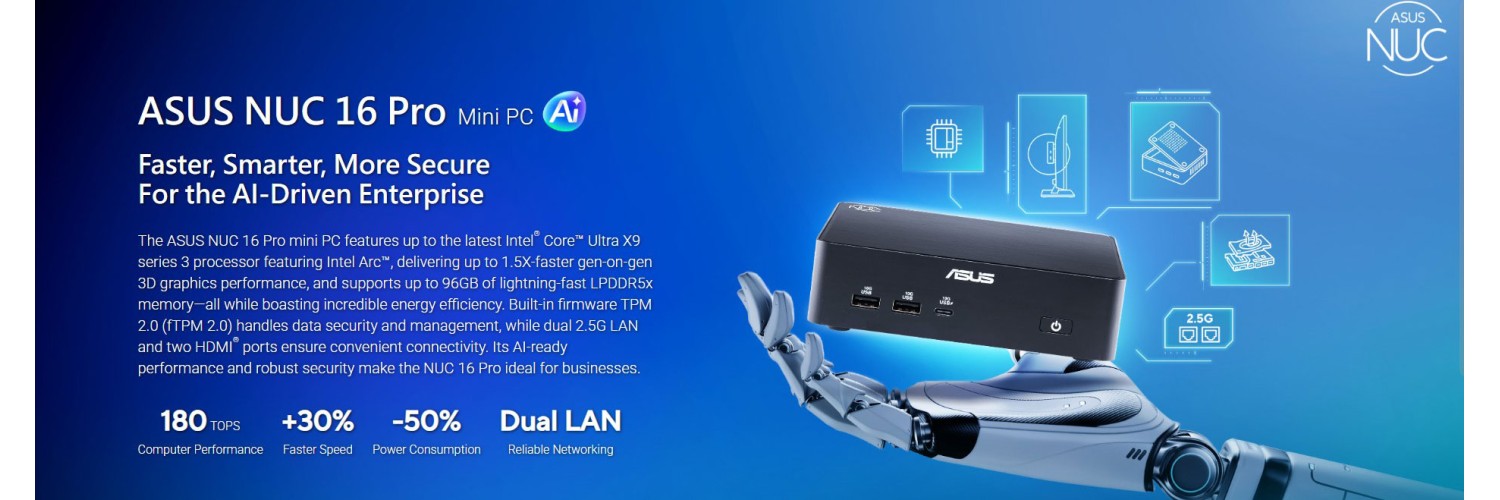
Who it’s for: power users, IT admins, creators, and small-business teams who want workstation-class responsiveness in a tiny, serviceable box—without the footprint (or maintenance) of a full desktop tower. Asus
Standout feature: AI-forward “hybrid XPU” platform (CPU + Arc
iGPU + NPU 5) plus dual 2.5G LAN and Gen5 NVMe
support—built for modern office + edge/creator workloads. Asus
ASUS positions the NUC
16 Pro as a compact “AI-driven enterprise” machine: secure (fTPM), centrally
manageable (ASUS Control Center / Edge Suite), and expandable with a tool-less
chassis designed for real deployments like multi-display workstations, secure
IT endpoints, edge inference, kiosks/POS, and industrial automation. Asus
Coming soon on
NationalPC.in (India
availability + configurations will matter a lot for value—more on that in the
buying guide).
Specs table (as
announced in ASUS datasheet)
|
Spec |
ASUS NUC 16 Pro
(NUC16GDK / Kit / Board) |
|
CPU options |
Intel Core Ultra
X9 388H (up to 65W), Core Ultra X7 358H (up to 65W),
Core Ultra 7 356H (up to 65W), Core Ultra 5 325 (up to 45W)
Asus |
|
iGPU |
Intel Arc
Graphics (higher SKUs) /
Intel Graphics (some SKUs) Asus |
|
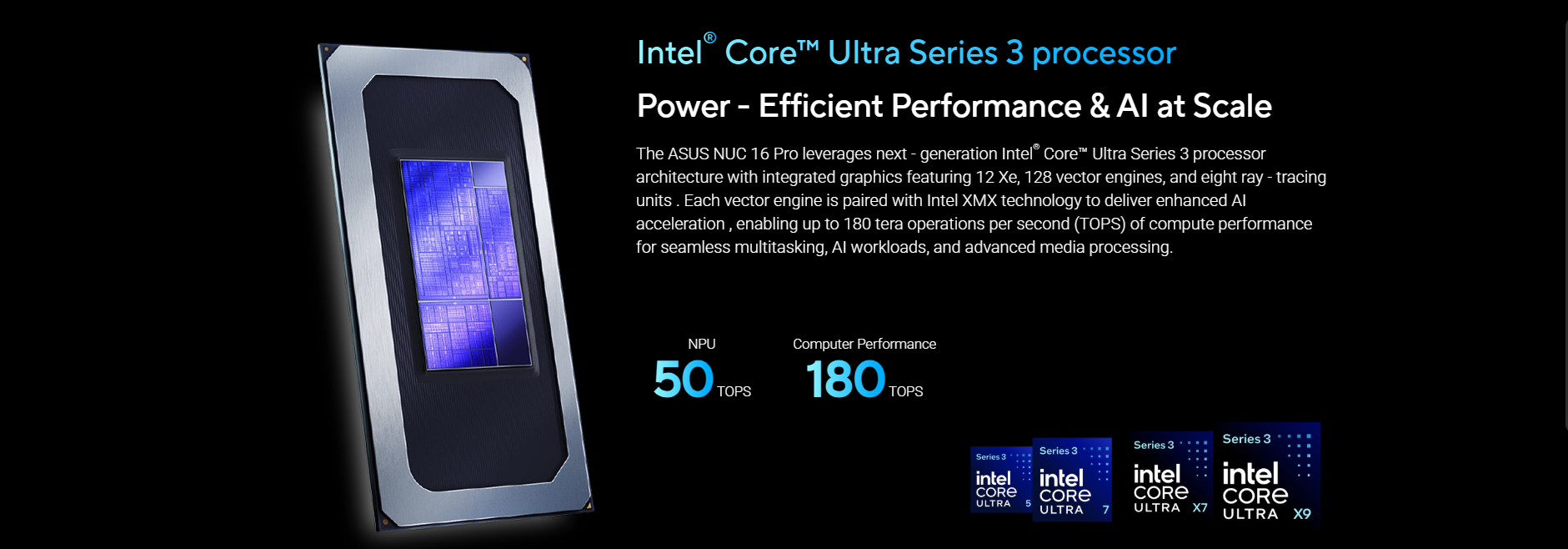
NPU |
NPU 5 (AI acceleration), “up to 180 Platform
TOPS” (platform claim) Asus |
|
RAM type / max |
Onboard dual-channel LPDDR5x/LPDDR5 up to 96GB
(LPDDR5x listed at 9600 MT/s) OR dual-channel DDR5 CSO-DIMM
up to 128GB (SKU-dependent) Asus |
|
SSD slots |
2× M.2 2280 Key-M: 1× PCIe Gen5 x4 + 1× PCIe Gen4 x4,
supports 128GB–8TB NVMe Asus |
|
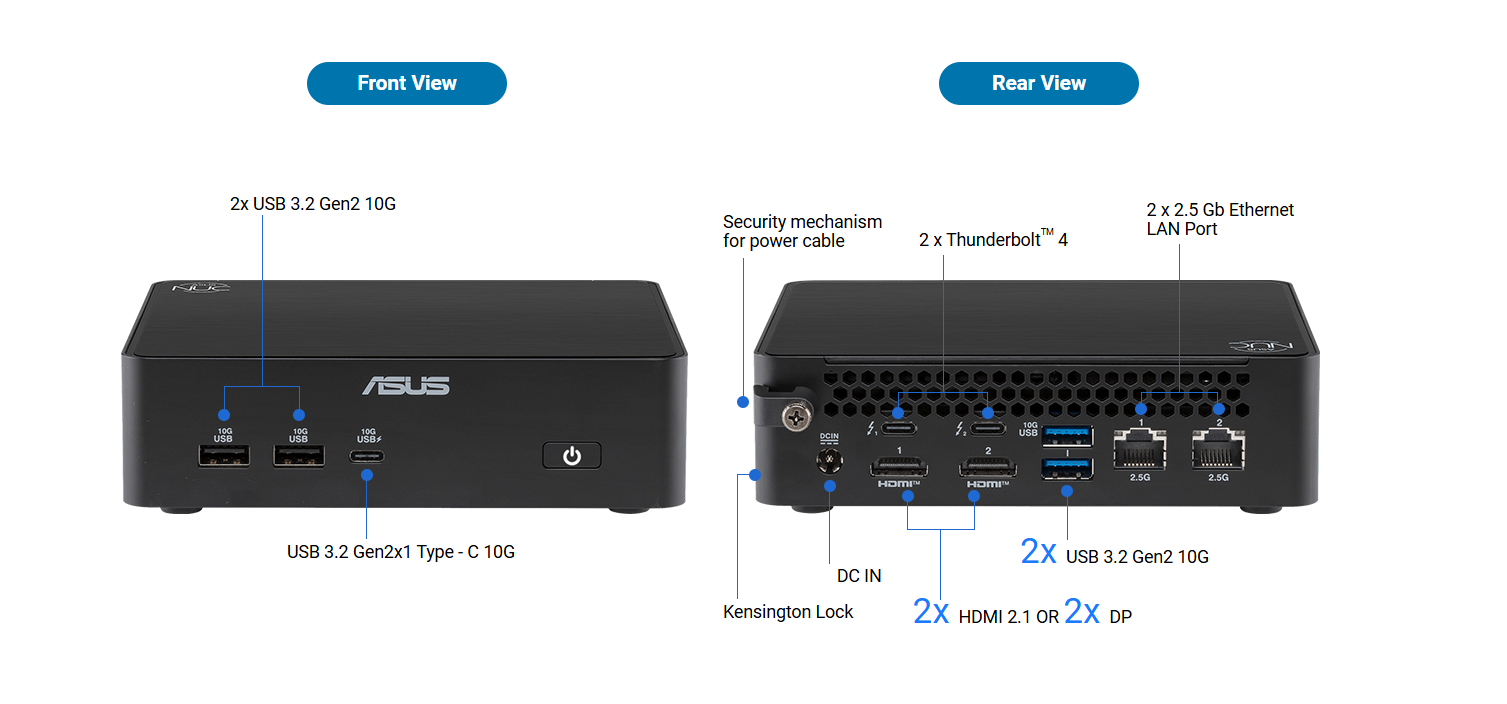
Front ports |
1× USB-C (USB 3.2
Gen2x1, 10Gbps), 2× USB-A
(USB 3.2 Gen2, 10Gbps) Asus |
|
Rear ports |
2× USB 3.2
(10Gbps), 2× Thunderbolt
4 (USB-C), 2× RJ45 (2.5G), 2× HDMI 2.1 or 2× DP
2.1 (SKU), DC-in Asus |
|
LAN |
Dual 2.5G LAN Asus |
|
Wi-Fi / BT |
Wi-Fi 7 + Bluetooth 6.0 Asus |
|
Multi-monitor |
Up to quad
extended displays; HDMI SKU supports “Power Sync” (per datasheet note) Asus |
|
Audio |
Digital audio via
HDMI / DP over Type-C; up to 7.1 multichannel (8-channel) Asus |
|
Security |
fTPM 2.0 (Intel Platform Trust Tech), option for
discrete TPM 2.0 (note) Asus |
|
Power |
120W–150W AC adapter (varies by model) Asus |
|
Chassis / service |
Tool-less Chassis
2.0, spring-loaded hinged
lever design Asus |
|
Size / weight |
144 × 117 × 42 mm (Mini PC/Kit), ~750–910g (Mini PC) Asus |
|
Noise |
Up to 38 dBA
max; “0 RPM under idle” Asus |
Performance
expectations (expert view)
A useful way to think
about the NUC 16 Pro is: laptop-class silicon at higher sustained power (up
to 65W on top SKUs) in a compact box, with faster storage (Gen5 NVMe) and
better wired networking (dual 2.5G) than most laptops. Asus
1) Office +
browsing
For Excel-heavy
workflows, 30–60 browser tabs, Teams/Zoom, and multi-monitor productivity, this
class of CPU + fast NVMe is typically “instant-feel” fast. The bigger win here
isn’t peak benchmarks—it’s responsiveness under mixed load (background
sync, antivirus, Teams, browser, spreadsheets) thanks to modern core scheduling
and fast storage.
India context: if you’re replacing older 8th–11th gen Intel
desktops in offices, expect a massive jump in responsiveness and much better
multi-monitor support, in a device you can VESA-mount behind monitors.
2) Coding/dev +
Docker/VMs
This is where config
selection matters:
- If your NUC 16 Pro SKU uses onboard
LPDDR5x, you’re buying a “fixed-memory appliance” (choose the RAM size
upfront). Asus
- If your SKU supports DDR5 CSO-DIMM up
to 128GB, it becomes a serious mini homelab / dev box. Asus
For Docker + local
databases + a couple of VMs, 32GB is the practical floor, and 64GB
is where it stops feeling cramped. With Gen5 + Gen4 M.2 slots, you can cleanly
split workloads (OS/apps on one drive, containers/VM images on the other). Asus
3) 4K media + HDR
With modern Intel
media blocks and HDMI 2.1 / DP outputs, you should expect smooth 4K playback,
streaming + local files, and clean HTPC behavior—especially if you keep drivers
updated. The unit supports digital audio over display outputs up to
multichannel. Asus
Tip: If you’re building a living-room PC, pick the
HDMI SKU and plan airflow (see thermals section).
4) Light gaming /
iGPU limits
The headliner here is Intel
Arc Graphics (on higher SKUs). Asus
That’s meaningful for:
- esports at 1080p (settings tuning needed),
- older AAA titles at medium settings,
- creator apps that benefit from GPU
acceleration.
But it’s still an
iGPU: VRAM is shared, power is shared, and sustained gaming loads are
limited by the cooling and TDP envelope. If your priority is modern AAA at high
settings, you’re still in “small desktop with a discrete GPU” territory.
5) AI workloads
(NPU realism + use cases)
ASUS highlights NPU
5 and up to 180 Platform TOPS (platform-level claim, not just NPU). Asus
The practical takeaway: this NUC is designed for on-device AI acceleration,
but realistic use cases are:
- Windows Studio Effects, background blur/eye contact/noise
suppression
- local transcription, meeting notes, and real-time
summarization tools
- image workflows: background removal, denoise,
auto-tagging (app-dependent)
- edge inference prototypes: computer vision pipelines, sensor/IoT
aggregation, lightweight models at the edge
What it’s not:
a replacement for a proper CUDA workstation or a server GPU if you’re training
large models. For power users, the NPU is best treated as a latency +
efficiency accelerator for supported apps, not a magic “runs any AI fast”
button.
Thermals &
noise: what to expect
ASUS calls out a dual-fan
thermal design to sustain CPU performance in the compact chassis, with
noise up to 38 dBA max and even “0 RPM under idle” behavior. Asus
In real usage, the
patterns are predictable:
- Sustained CPU loads (compiling, rendering,
heavy VMs) will ramp
fans—65W in a small box needs airflow. Asus
- Mixed workloads (office + calls + browsing) should stay
relatively quiet.
- Placement matters more than on a tower.
Airflow tips
(actually useful):
- Don’t sandwich it between a wall and a
monitor stand—leave rear exhaust room.
- If VESA-mounted, avoid tight “pockets”
behind the display.
- Keep the side vents unobstructed and clean
(dust is the silent performance killer).
Upgradeability
& serviceability (warranty-safe mindset)
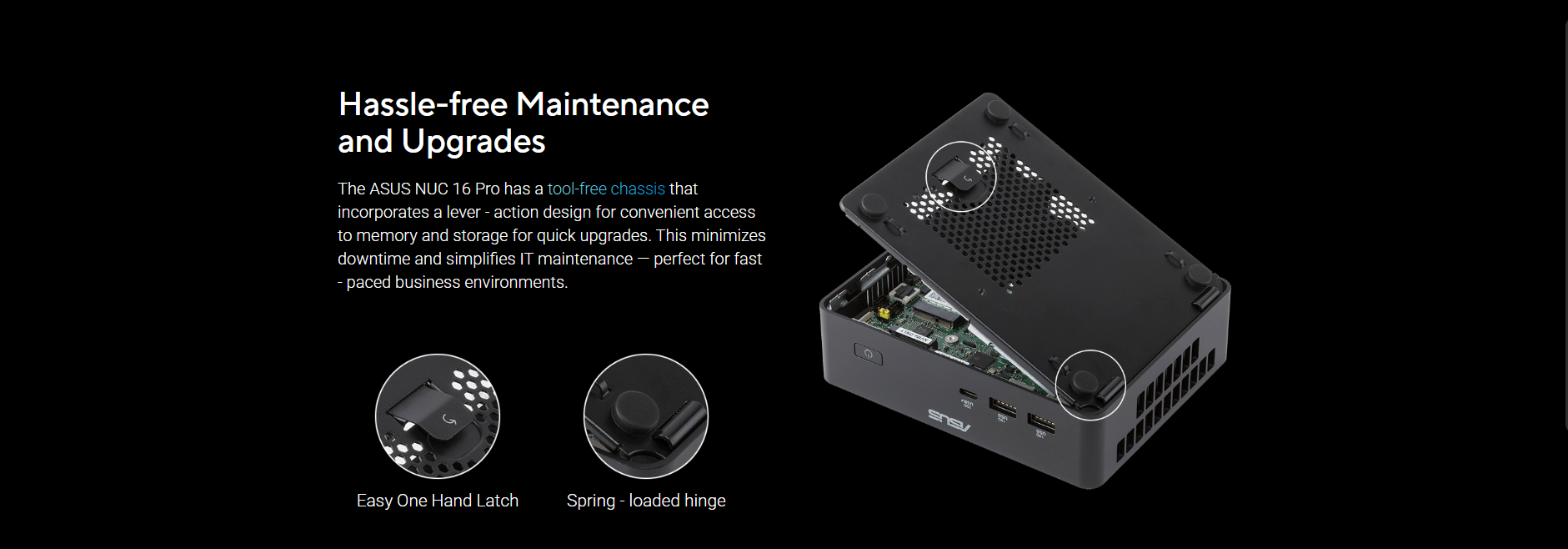
The NUC 16 Pro is
designed around Tool-less Chassis 2.0 with a spring-loaded lever
mechanism. Asus
Storage is straightforward: two M.2 2280 slots (Gen5 + Gen4) are exactly
what power users want. Asus
The big caveat is
memory: ASUS lists onboard
LPDDR5x/LPDDR5 up to 96GB or DDR5 CSO-DIMM up to 128GB
depending on SKU. Asus
So before buying for IT fleets or homelabs, confirm which memory design you’re
getting—because that decides whether RAM is field-upgradable or fixed.
Connectivity deep dive (why this NUC is “IT-friendly”)
 Thunderbolt 4 /
USB-C
Thunderbolt 4 /
USB-C
You get 2×
Thunderbolt 4 ports on the rear, plus a front USB-C (10Gbps). Asus
For admins and creators, TB4 means:
- fast docks (single-cable desk setups),
- high-speed external SSDs,
- multi-display via Type-C DP Alt Mode,
- simplified peripheral standardization.
Dual 2.5G LAN
Dual 2.5G LAN
is not a gimmick—it’s practical for:
- network redundancy (failover),
- separating management and production
traffic,
- small office routing / lab networks
(within reason). Asus
Wi-Fi 7 + Bluetooth
6.0
For modern offices and
studios, Wi-Fi 7 is a forward-looking choice (especially as India’s Wi-Fi 6/6E
adoption grows). Bluetooth 6.0 is also a nice bump for peripherals. Asus
Multi-monitor
support
ASUS states up to
quad extended displays, and you can choose dual HDMI 2.1 or dual DP 2.1
depending on SKU. Asus
For creator desks (timeline + preview + tools) or trading-style workstations,
this is a big part of the value proposition.
Who should buy /
who should avoid
Should buy (clear
fit)
- IT admins deploying compact, manageable endpoints
with strong wired networking (dual 2.5G) and TPM-based security. Asus
- Creators who need multi-display setups and fast local NVMe scratch (Gen5 +
Gen4). Asus
- Developers / homelab builders who want a clean mini-PC with two NVMe
slots—and especially if your SKU supports upgradable DDR5. Asus
- Small businesses that want “set-and-forget” desktops (VESA
mount, easy upgrades, fewer cables).
Should avoid (or be
cautious)
- You want AAA gaming at high
settings (get a dGPU system).
- You need guaranteed field-upgradable
RAM but the available SKU is LPDDR-only (choose carefully). Asus
- Your workload is GPU training or
heavy CUDA pipelines (this isn’t that machine).
- You require front audio jack /
analog audio I/O (NUC lines often lean digital; confirm your exact
SKU/board needs).
Comparison: NUC 16
Pro vs two typical alternatives
1) Previous-gen:
ASUS NUC 15 Pro
Why some buyers
will still pick NUC 15 Pro:
it’s a proven “office + AI-ready” compact platform with Wi-Fi 7, TB4, Gen5
NVMe, and up to 96GB DDR5 via SO-DIMM/CSO-DIMM options (depending on model). Asus
NUC 16 Pro
advantages:
- Up to 65W TDP CPU options (higher
sustained headroom on top SKUs). Asus
- Dual 2.5G LAN vs NUC 15 Pro’s single 2.5G in the
datasheet. Asus+1
- Newer NPU 5 + Arc B390 positioning
and higher platform TOPS claim. Asus
NUC 15 Pro still
strong if:
- pricing is meaningfully lower in India,
- you prefer the more established ecosystem
and availability,
- your workloads don’t benefit from the
newer platform.
2) Similar-priced
competitor: Minisforum UM890 Pro (Ryzen 9 8945HS)
Minisforum’s UM890 Pro
is a common “power mini PC” alternative: Ryzen 9 8945HS + Radeon 780M, up to
70W, DDR5 up to 96GB, dual USB4, dual 2.5G LAN, and Wi-Fi 6E.
official store
NUC 16 Pro
advantages (on paper):
- Wi-Fi 7 + Bluetooth 6.0
(newer wireless spec stack). Asus
- Optional DP 2.1 / HDMI 2.1
configurations plus TB4, and enterprise positioning with ASUS
management/security messaging. Asus
- Dual M.2 with Gen5 + Gen4 as a
clear storage story. Asus
UM890 Pro
advantages:
- Strong Radeon 780M iGPU reputation in
light gaming scenarios (and sometimes better value depending on Indian
pricing/imports).
- USB4 + dual 2.5G already ticks many
homelab boxes. official store
Bottom line: your decision will likely come down to India
pricing + warranty/service comfort vs raw spec value.
Buying guide (best
configs for India)
Exact SKUs and pricing
for India will decide the “deal.” But here’s a sensible mapping.
Config 1: 16GB /
512GB
Best for:
- office desktops (accounts, ERP/CRM,
browsing, Teams),
- POS/kiosk signage,
- light creator workloads.
Choose this only if
the RAM is upgradable later or you’re sure the workload stays light.
Config 2: 32GB /
1TB (the sweet spot)
Best for:
- developers (Docker + local services),
- creators (Photoshop/Light video edits,
caches),
- power users with multi-monitor setups.
This is the most
balanced build for most professionals in India.
Config 3: 64GB /
2TB (or 32GB + dual SSDs) (power/homelab)
Best for:
- Proxmox/VM labs,
- heavier container stacks,
- data + scratch separation (Gen5 OS/apps +
Gen4 projects, or vice versa). Asus
FAQ (India buyer
questions)
- Can it be used as a NAS?
Yes for light NAS duties (file sharing, backups). For serious multi-drive NAS, you’ll still prefer a dedicated NAS chassis with multiple bays. - Plex server—will it do 4K?
For direct play, yes. For heavy transcoding, it depends on codec/bitrate and how many simultaneous streams you expect. - Good for a homelab?
Very—especially because of dual 2.5G LAN and dual NVMe slots. Asus - Proxmox / VMware / Hyper-V support?
Typically fine for modern Intel platforms, but always validate driver/kernel support for your exact NIC/Wi-Fi modules and BIOS options. - Windows or Linux?
ASUS lists Windows 11 variants and also Ubuntu / RHEL support in the datasheet for Kit/Board contexts. Asus - How many monitors can it run?
ASUS states up to quad extended displays, with dual HDMI 2.1 or dual DP 2.1 (SKU) plus Thunderbolt outputs. Asus - Is RAM upgradeable?
Depends on SKU: onboard LPDDR5x (fixed) vs DDR5 CSO-DIMM (up to 128GB). Confirm before purchase. Asus - Power consumption—will it be expensive to
run?
Idle should be low for a modern mini PC; under sustained load it can climb, especially on 65W SKUs. The adapter range is 120W–150W, which hints at the ceiling. Asus - How loud is it?
ASUS quotes up to 38 dBA max and “0 RPM under idle.” Real noise depends on ambient temp, dust, and sustained load. Asus - Is it suitable for 24×7 business use?
It’s positioned for enterprise/edge deployment with security and management tooling; for 24×7, focus on ventilation, dust control, and stable power. Asus
Final verdict
The ASUS NUC 16 Pro
looks like a proper “next-gen mini workstation”: Gen5 + Gen4 NVMe,
dual 2.5G LAN, Wi-Fi 7, Thunderbolt 4, and a clear AI
angle via NPU 5—all in a compact, tool-less chassis that’s realistic for
IT fleets and creator desks. Asus
The only buying “trap”
is memory design: if you need long-term flexibility, prioritize SKUs
with DDR5 CSO-DIMM support; if you’re fine with fixed RAM, LPDDR5x
models can still be excellent (and efficient). Asus
Launch offer
callout
ASUS NUC 16 Pro — Coming soon on nationalPC.in
If you want, share your target use case (office / dev / creator / homelab) and
I’ll recommend the best CPU + RAM choice and a smart SSD pairing
(Gen5 vs Gen4) for your budget.
Leave a comment